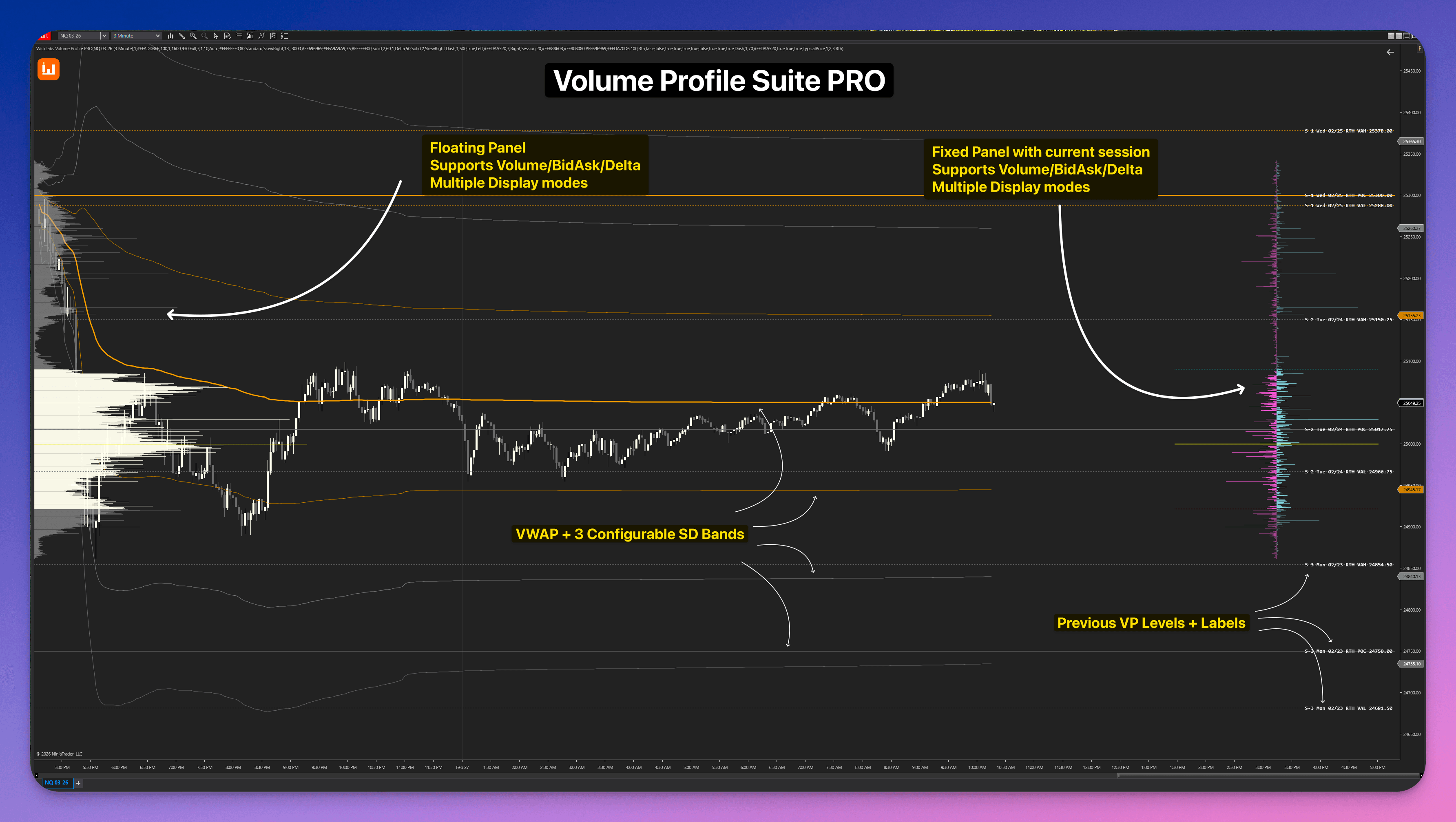
Volume Profile Suite PRO
The complete Volume and Delta Profile toolkit for NinjaTrader 8.
Floating Profiles · VP Confluence Zones · Delta Profile · Fixed Panel · HVN & LVN · Anchored VWAP
Volume Profile Suite PRO is a comprehensive volume and delta analysis toolkit for NinjaTrader 8. Choose from eight floating profile types: Session, Daily, Weekly, Monthly, Rolling N Days, Every N Bars, Every N Hours, and All Loaded. Also includes a screen-pinned live session panel, session VWAP with 3 standard deviation bands, VP Confluence Zones, tick-accurate Bid/Ask and Delta modes, algorithmic HVN/LVN detection, and Anchored drawing tools, all in one add-on. Optional weekly/monthly VWAP with separate colors and deviation bands.
Where the Volume Actually Traded
Every contract gets logged to the price where it actually traded. Total volume, bid/ask split, or net delta — session, weekly, monthly, any custom range, doesn't matter. The floating profiles scroll with your chart. The live panel stays pinned to your screen. Anchored tools grab whatever range you throw at them. All tick data, no estimates.
Volume Profile PRO: Read the Session | Profiles, Value Area, Delta & VWAP
The Ultimate Orderflow Suite: Floating historical periods, real-time fixed session panel, and the precision anchored drawing tool.
Stop cluttering your NinjaTrader with five different profile indicators.
Traders often string together an endless mess of separate components: one add-on for a session profile, another for a fixed delta panel on the right, and yet another expensive subscription for a decent anchored tool.
The Volume Profile Suite PRO eliminates this entirely. One package ships with eight floating profile period types, VP Confluence Zones for multi-profile level agreement, a screen-pinned live session panel, a dedicated chart settings window, automatic HVN/LVN detection and projection, session VWAP with standard deviation bands, and the Anchored VWAP and Anchored Delta Profile drawing tools. Every component shares the same tick data engine and supports Standard, Bid/Ask, and Delta Profile display modes independently. Optional weekly/monthly VWAP with separate colors and deviation bands.
Why fragmented profile tools hurt
This fragments your workflow and forces you to pay repeatedly for tools that don't share data or settings with each other.
One purchase. One chart add-on. Full structural coverage.
The complete volume and delta profile toolset
Trade structure professionally with the complete toolset available for all NinjaTrader license tiers.
See how each engine works on your chartFloating Profiles
Fixed Session Panel
Settings Panel
Session, Weekly & Monthly VWAP
Anchored VWAP
Anchored Profile Tool
HVN & LVN (High & Low Volume Nodes)
VP Confluence Zones
Display Modes
Extended Reference Lines
Session Intelligence
Strategy Automation
View full capability reference
Floating Profiles
Fixed Session Panel
Settings Panel
Session, Weekly & Monthly VWAP
Anchored VWAP
Anchored Profile Tool
HVN & LVN (High & Low Volume Nodes)
VP Confluence Zones
Display Modes
Extended Reference Lines
Session Intelligence
Strategy Automation
Eight period types
One engine and the same display modes. Session, calendar, bar, or clock boundaries.
Click a type to see how it works.
Learn Volume Profile PRO
Start with profiles, value area, Delta and session VWAP, then continue through HVN/LVN, confluence zones and the anchored drawing tools.
Volume Profile PRO: Read the Session | Profiles, Value Area, Delta & VWAP
One suite. Total coverage.
Every component ships within one NinjaTrader add-on. No separate purchases. No disconnected tools. The floating profiles, session panel, anchored VWAP, and anchored drawing tool are all built to work together.
Floating Time Profiles
Volume profiles rendered directly on your chart, aligned to the candles they belong to. Each period keeps its historical structure exactly where it belongs and scrolls with your chart naturally.
- 01Session, Daily, Weekly, Monthly, Rolling N Days, Every N Bars, Every N Hours, and All Loaded
- 02Every N Hours splits the day into fixed clock blocks using your chart's Trading Hours timezone (for example 4-hour blocks from midnight Central on typical CME futures charts)
- 03Display any number of historical profiles simultaneously using the history ring; custom session windows for specialized markets
- 04Hide the developing profile with one switch to keep live price action clean while completed profiles and the pinned panel keep updating
Floating Profiles: Session, Day, Week, and Month profiles rendered directly on your chart, scrolling with your history.
Volume profiles rendered directly on your chart, aligned to the candles they belong to. Each period keeps its historical structure exactly where it belongs and scrolls with your chart naturally.
- 01Session, Daily, Weekly, Monthly, Rolling N Days, Every N Bars, Every N Hours, and All Loaded
- 02Every N Hours splits the day into fixed clock blocks using your chart's Trading Hours timezone (for example 4-hour blocks from midnight Central on typical CME futures charts)
- 03Display any number of historical profiles simultaneously using the history ring; custom session windows for specialized markets
- 04Hide the developing profile with one switch to keep live price action clean while completed profiles and the pinned panel keep updating
Floating Profiles: Session, Day, Week, and Month profiles rendered directly on your chart, scrolling with your history.
A live profile panel pinned to the right edge of your screen. No matter how far you scroll into the past to review history, the current session's volume structure is always in view.
- 01Completely independent bin size from the floating profiles. Configure for your preferred tick granularity
- 02Supports Standard, Bid/Ask Split, and Delta modes independently from the floating layer
- 03Optional numeric volume or delta values printed directly inside the bars
- 04Dedicated POC and Value Area line controls, separate from the extended line settings
Fixed Session Panel: Always pinned to the screen right edge. Scroll anywhere on your chart without losing the current session's live structure.
Configure your parameters instantly from the chart toolbar. The interface separates refresh-safe options from reload-required choices, making adjustments fast and clean. Toolbar buttons for inactive chart tabs are dimmed and disabled; switching away closes that tab’s settings window.
- 01Toolbar buttons for inactive chart tabs are dimmed and disabled; switching away closes that tab’s settings window.
- 02Apply visual changes, colors, overlays, and grouping properties with zero lag
- 03Visual legends explain abbreviations and parameters directly inside the window
- 04Clearly see which parameters require a historical chart reload before applying them
Dedicated Settings Panel: Manage all visual parameters, line styles, opacities, and display modes instantly from the chart toolbar.
Session VWAP and optional developing weekly/monthly curves use the selected VWAP price source and session window. Load chart history from the start of the trading period.
- 01Session VWAP keeps its existing anchor and deviation bands
- 02Weekly and monthly curves and their bands default off; each period has its own color
- 03Three deviation-band pairs per period use the shared SD multipliers
- 04Calculated from loaded chart bars; values can differ with chart interval
Session VWAP: Resets at session open with 3 standard deviation bands on each side. RTH and ETH modes included.
An independent NinjaTrader drawing tool, fully included with your license. Place it from the drawing tools menu and click two candles to instantly generate a precise Anchored Delta Profile or volume profile across any custom range.
- 01Two-click placement: set a start and end candle; the profile builds immediately from bar data
- 02Calculate-to-Last-Bar mode: anchor to a start date and the profile keeps extending live as the session develops
- 03Flip Profile option to mirror bar direction for cleaner multi-tool chart layouts
- 04When the main indicator is active, the drawing tool automatically uses its shared tick data for tick-accurate Bid/Ask and Delta
Anchored Profile Tool: Two-click placement to build a precise Anchored Delta Profile across any range. Included at no extra cost.
A fully-featured Anchored VWAP is included in your license at no extra cost. Unlike the session VWAP which resets daily, this one anchors to any point you choose and stays there.
- 01Anchor mode: follows the active session (RTH or ETH), or lock it manually to any bar
- 02Three configurable Standard Deviation bands with independent multipliers
- 03Price source options: Close, Typical Price (HLC3), or OHLC4 for calculation accuracy
- 04Rendered as native NinjaTrader plots, stays in sync with price scale automatically
Anchored VWAP: Lock to any bar and track value from that point forward. 3 SD bands with configurable multipliers.
Automatically detect and project key structural levels. High-volume peaks highlight consolidation zones, while low-volume valleys identify areas where price moves quickly.
- 01Select between Percentile and Peak & Valley mathematical detection methods
- 02Project levels across the chart from either the floating profiles or the fixed panel
- 03Cluster adjacent flagged levels dynamically to keep your chart clean
- 04Retire projected lines automatically on price touch or body close-through
High & Low Volume Nodes: Algorithmic detection of historical peaks and valleys with dynamic chart projection and auto-retirement.
Highlight price areas where levels from multiple completed volume profiles stack near the same price. A common case: yesterday's POC and today's VAH sitting at roughly the same handle.
- 01Groups nearby levels from completed profiles within a configurable tick radius
- 02Minimum Profiles and Minimum Levels filters require real multi-period agreement, not one busy profile on its own
- 03Right-edge labels show how many profiles and levels merged into each zone
- 04Zones can retire on touch or close-through. Scan depth follows your Profile Count and Extended Line Count settings
VP Confluence Zones on a NinjaTrader 8 chart showing a multi-profile agreement zone.
Every tool in the suite (floating profiles, fixed panel, anchored drawing tool) can be switched independently between three visualization modes. Read exactly what the market is telling you.
- 01Standard Volume: classic profile structure showing total contracts traded at each price level
- 02Bid/Ask Split: separates aggressive market buys (on the Ask) from aggressive market sells (on the Bid) with a centerline layout
- 03Pure Delta Profile: shows the net difference between buyers and sellers at each price. Instantly see where dominance shifted
- 04Skew modes (Classic, SkewRight, SkewLeft) for asymmetric BidAsk/Delta bar layouts
Display Modes: Standard, Bid/Ask Split, and pure Delta applied independently to any profile component on the chart.
Every closed profile can project its POC, VAH, and VAL lines forward. This creates a ladder of institutional levels that remain visible as price action develops, giving you clear targets and rejection zones.
- 01Lines automatically extend from every historical profile loaded on the chart
- 02Dynamic price labels appear at the end of each line for instant level identification
- 03Independent styling: use different colors, widths, and dash styles for POC vs. Value Area
- 04Live tracking: current session lines also extend in real-time as the profile develops
Integrate volume structure directly into your automated systems. Volume Profile Suite PRO exposes POC, VAH, VAL, and VWAP values for use in NinjaTrader's Strategy Builder and coded NinjaScript.
- 01Strategy Builder integration: pick POC/VAH/VAL plots directly in conditions
- 02Coded NinjaScript support: public Series(double) properties for all profiles
- 03Strategy-ready VWAP & SD bands: use mean reversion logic in automation
- 04Supports NinjaTrader Strategy, Strategy Builder, and third-party tools
Volume Profile PRO: Read the Session | Profiles, Value Area, Delta & VWAP
Three Display Modes Each Tells a Different Story
Switch any profile component to the mode that answers your current question. Mix and match independently across floating, fixed panel, and anchored tools.
Standard Volume
Total contracts traded per price level. Identify high-volume nodes (HVN) and low-volume nodes (LVN) that act as magnets or rejection zones in subsequent sessions.
Bid/Ask Split
Volume separated into aggressive market buys (hitting the Ask) from aggressive market sells (hitting the Bid). See which side controlled each price level.
Pure Delta Profile
Net buy volume minus sell volume at every price. Positive delta means buyers dominated. Negative delta means sellers won the transaction flow at that level.
Don't buy one indicator. Own the suite and keep $319.96 in your pocket.
Buying all five separately costs $999.95. Get the complete bundle for $679.99 (lifetime), or subscribe for $89.99/mo.
Low-friction entry to the full suite. Cancel anytime.
- Cancel anytime
- All 5 indicators included
Pay once, own forever. Includes all updates.
- One-time payment
- All future updates free
- All 5 indicators included
One price. Lifetime access.
No subscriptions. No tiers. No hidden fees. Pay once, keep every engine and every future update.
Volume Profile Suite PRO Lifetime License
- Eight Floating Profile Types (Session through Every N Hours and All Loaded)
- Screen-Pinned Fixed Session Panel & Dedicated Settings Panel
- VP Confluence Zones & Algorithmic HVN/LVN Detection
- Session, Weekly, Monthly & Anchored VWAP with optional SD bands
- Included Anchored Volume & Delta Profile Drawing Tool
- Tick-Accurate Bid/Ask Split and Pure Delta Profile Modes
- Extended Historical POC, VAH, and VAL Reference Lines
- Full NinjaTrader Strategy & Builder Automation Support
- Lifetime access, no monthly subscriptions
- Comprehensive documentation included
Full functionality. No credit card required.
Disclaimer: WickLabs software is provided "as is" for educational purposes only. It is not financial, investment, or trading advice. See our Terms of Service and Disclosures for full details.
NinjaTrader® is a registered trademark of NinjaTrader Group, LLC. No NinjaTrader company has any affiliation with the owner, developer, or provider of the products or services described herein.
What Traders Say
Hear from traders who use Volume Profile Suite PRO in their daily workflow.
Latest Updates
We ship fast. Here's what's new in Volume Profile Suite PRO.
- • Added Session Profile Resolution under Session for the Fixed Panel and floating Session profiles. Auto is the default and selects Tick when the primary chart has Tick Replay enabled, or uniform completed-minute estimates in both history and realtime without it. The source hint shows Auto: Tick or Auto: Minute. Minute always uses the same uniform one-minute total-volume estimate in history and realtime. Tick uses trades and requires Tick Replay. Reload the chart after changing it.
- • Kept each published histogram, POC, value area and total volume together as one snapshot, including the last historical replay ticks before realtime begins.
- • Corrected completed-minute accounting and session-boundary callback ordering so duplicate or late callbacks cannot discard or contaminate a new session's opening volume.
- • Optional developing Weekly VWAP and Monthly VWAP alongside Session VWAP, with independent enable switches, colors, and optional three-pair deviation bands. Both periods and their bands default off; existing session VWAP settings remain unchanged.
- • Fourteen higher-period plot outputs for coded NinjaScript and Strategy Builder. Existing plot indices are preserved.
- • VP toolbar buttons now follow their owning chart tab: inactive-tab buttons are disabled and dimmed, and switching away closes that tab's settings window. This matches chart tabs; multiple VP instances on the same tab remain enabled.
- • Added a default-on Show Selected Range outline to the Anchored Volume Profile, making the selected candles easier to identify. Click the border to select the drawing.
- • Corrected anchored profile positioning so normal profiles grow right inside the selected range and Flip Profile grows left from the opposite end, including reversed anchors and Calculate To Last Bar.
- • Corrected centered BidAsk and Delta profile positioning. Volume calculations and POC/VA values are unchanged.
Volume Profile Suite PRO FAQ
Complete settings reference for every profile type and display mode.
FAQs covering tick replay, session boundaries, and display modes.
Everything you need to get started.
Every setting in the suite is fully documented. From configuring bin size per instrument to understanding the difference between Bid/Ask Split and Delta mode, the knowledge base covers it all.
Session boundaries, tick replay requirements, display modes, drawing tool placement and more.
Every profile type, panel control, VWAP parameter, and display mode explained with practical context.
Access to the full knowledge base is provided upon trial activation.
Stop guessing. Read the structure.
Floating profiles, a pinned session panel, session VWAP, anchored VWAP, and an Anchored Delta Profile drawing tool. All in one NinjaTrader 8 add-on. One-time purchase, lifetime updates, no monthly fees.