Key Levels PRO
Pivots, structure, and confluence on one chart.
Pivots · OHLC · Opening Range · Initial Balance · Globex · VWAP · Volume Profile · Confluence · Alerts · Sessions
Key Levels PRO is a multi-engine market structure indicator for NinjaTrader 8 that automates the detection of pivot points, session ranges, and high-probability confluence zones. The system integrates daily, weekly, and monthly pivots across Classic, Woodie, Camarilla, DeMark, and Fibonacci styles, plus previous period OHLC, opening range, initial balance, Globex sessions, VWAP with deviation bands, tick-accurate volume profile, and a proprietary confluence zone engine. Built specifically for the high-performance NinjaTrader 8 ecosystem.
Automated Confluence
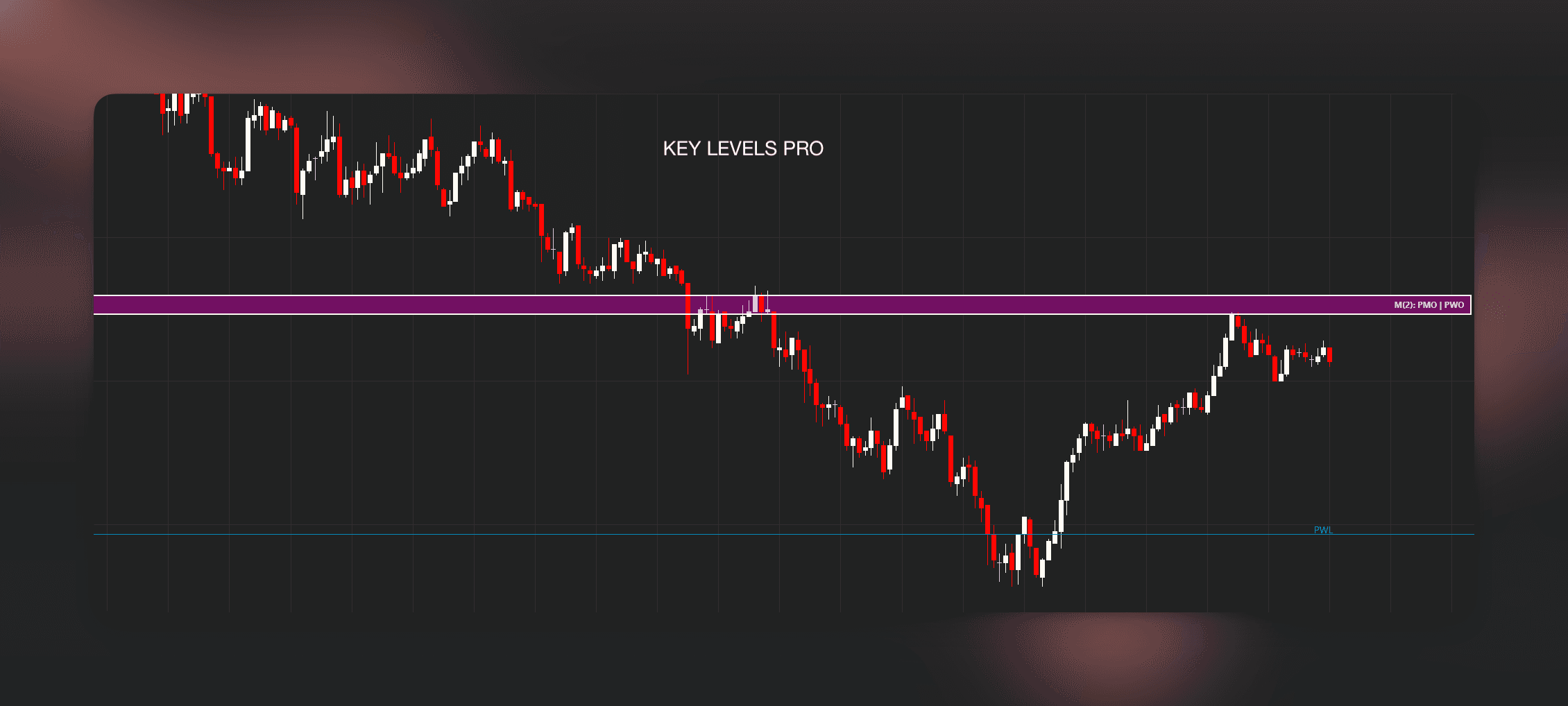
Experience the clarity of raw line levels overlapping natively with auto-clustered zones.
Previous Day Levels, Opening Range & Initial Balance | Key Levels PRO for NinjaTrader 8
Key Levels PRO merging raw line references with auto-clustered confluence zones on the same chart.
Line Levels & Structure
Daily pivots, previous session extremes, and opening ranges lay down the raw structural boundaries where the market traditionally reacts.
The Confluence Zones
Our engine groups the most densely populated price levels into actionable 'Hot Zones', eliminating the guesswork of choosing which line to trade.
You're probably running six indicators to do what this one does.
Previous day high/low from one indicator. Pivots from another. VWAP from a third. Opening range from a fourth. Globex levels from a fifth. Maybe a volume profile tool on top. Each with its own settings panel, its own color scheme, its own performance overhead, its own quirks around holidays and weekends.
Key Levels Pro replaces that entire stack. Pivot points, previous period OHLC, VWAP, Volume Profile, session ranges, and Globex references feed into a confluence zone builder that does the clustering for you, scores each zone by strength, and renders it directly on your chart.
Why traders stack six indicators
And even after all that setup, you're still eyeballing where levels cluster. You're mentally stacking daily pivots against previous highs, VWAP bands, and opening range extremes, then deciding in real time whether that's a meaningful zone or just noise.
One indicator. One config panel. Levels you can trust.
Everything at a glance
Independent OR/IB session anchors and optional weekly/monthly VWAP join pivots, confluence, and realtime alerts in one indicator.
See how each engine works on your chartPrevious Period OHLC
Pivot Points
Opening Range
Initial Balance
Globex Sessions
VWAP
Volume Profile
Confluence Zones
Alert Engine
Settings Workflow
Session Lifecycle
Strategy Automation
View full capability reference
Previous Period OHLC
Pivot Points
Opening Range
Initial Balance
Globex Sessions
VWAP
Volume Profile
Confluence Zones
Alert Engine
Settings Workflow
Session Lifecycle
Strategy Automation
Every engine. One unified system.
We don't do 'all-in-one' indicators that lag...
Previous Period OHLC
Previous day high/low/open/close, previous week high/low, and previous month high/low. All resolved with holiday-safe fallback chains so you never get stale levels.
- 01Weekend and holiday safe - automatically resolves to the last valid trading day
- 02Uses HTF secondary series for week/month accuracy regardless of primary chart resolution
- 03Fallback chain: HTF series, BarsRequest, then primary-series accumulation
- 04Individual toggle for each level (PDH, PDL, PDO, PDC, PWH, PWL, PMH, PML)
Two clean rejections from a confluence zone where five key levels stack, spotted automatically by the engine.
Previous day high/low/open/close, previous week high/low, and previous month high/low. All resolved with holiday-safe fallback chains so you never get stale levels.
- 01Weekend and holiday safe - automatically resolves to the last valid trading day
- 02Uses HTF secondary series for week/month accuracy regardless of primary chart resolution
- 03Fallback chain: HTF series, BarsRequest, then primary-series accumulation
- 04Individual toggle for each level (PDH, PDL, PDO, PDC, PWH, PWL, PMH, PML)
Two clean rejections from a confluence zone where five key levels stack, spotted automatically by the engine.
Classic floor pivots are only the start...
- 01Supports Classic, Woodie, Camarilla, DeMark, and Fibonacci pivot styles
- 02Independent enable/disable controls for Daily, Weekly, and Monthly pivot families
- 03Per-tier visibility controls for PP, R1/S1, R2/S2, R3/S3, and R4/S4 where supported
- 04Uses the same previous-day session logic as the Previous Day engine, so RTH vs ETH pivots stay consistent with your chart mode
Chart Example: Multiple Rejections at Previous Day High (PDH)
The opening range captures the first N minutes of the session...
- 01Configurable OR duration in minutes
- 02Wick vs. close mode: use extremes or the candle close
- 03Automatic midpoint calculation for both OR and IB
- 04IB fixed at 60 minutes following market profile convention
Overnight session highs and lows are among the most-watched reference points...
- 01Pre-configured Asia and London session windows
- 02User override capability for custom session start/end times
- 03Automatic timezone handling - no manual DST adjustments needed
- 04High and Low tracked independently per session window
- 05Optional Combine Asia + London into Overnight - two lines (ONH/ONL) instead of four
Session-anchored Volume Weighted Average Price...
- 01Session-based VWAP anchored to the trading day open
- 02Three standard deviation bands (SD1, SD2, SD3) above and below
- 03Feeds into the confluence engine for multi-level intersection detection
- 04Optional exclusion from confluence zones via dedicated toggle
Granular Control: Session-Anchored VWAP & Standard Deviation Settings
Point of Control, Value Area High, and Value Area Low derived from actual tick-level volume data...
- 01Uses NinjaTrader tick replay for true volume-at-price accuracy
- 02Current session and previous session POC/VAH/VAL
- 03OHLC intrabar traversal fallback when tick data is unavailable
- 04Performance-guarded with recompute throttling
The heart of Key Levels Pro. It monitors all active engines...
- 01Configurable proximity threshold (Ticks/Points)
- 02Dynamic zone building with strength scoring
- 03Detailed tooltips showing contributors to each zone
- 04Gradient-based intensity rendering for visual clarity
Visual Intel: Overlapping Levels Building High-Probability Zones
Zone Logic: Customizable Proximity Thresholds & Scoring
Choose the market interactions worth interrupting you for. Level and zone triggers run only on realtime updates, with noise controls and three delivery channels.
- 01Approach, Touch, and Cross alerts for individual key levels
- 02Enter, Exit, and confirmed Breakout alerts for confluence zones
- 03Sound, chart-marker, and NinjaTrader Alerts Log delivery
- 04Tick-based thresholds, cooldown, quiet-period, and duplicate controls
Realtime alert triggers, tick thresholds, noise control, and delivery options in one focused tab.
Open Key Levels PRO from the chart toolbar and work through focused tabs instead of one long NinjaTrader property list.
- 01Dedicated chart toolbar access
- 02Separate tabs for session, level families, confluence, visuals, alerts, and license
- 03Apply Refresh for safe live changes
- 04Reload Chart only when history or session construction must rebuild
- 05Optional Multi-Chart Sharing - publish one Source calculation to Follower charts on the same contract
- 06One active-tab-aware toolbar button per chart window, with a picker when a tab holds multiple copies
The dedicated settings window separates each level family and clearly marks Refresh and Reload changes.
Running the same instrument on three charts used to mean calculating it three times. Set one well-loaded chart as Source and the others as Follower, and they project its finished levels and confluence zones instead of repeating the work. Entirely opt-in: every chart stays Local until you say otherwise.
- 01Explicit Local, Source, and Follower roles - Local is the default and nothing is shared until you change it
- 02Followers skip their own provider runtime and secondary minute series, and never fire duplicate alerts
- 03Matching is strict: same exact instrument contract, including expiry, plus a matching sharing group name
- 04Source-controlled rows are marked SOURCE and locked on Followers, while layout and appearance stay local
- 05One Inherit Source Colors switch imports the Source line palette when you want charts to look identical
The Multi-Chart Sharing tab names the current calculation path and spells out exactly what a Follower receives, what locks, and what stays local.
Switch between Regular Trading Hours, Extended Trading Hours...
- 01RTH, ETH, and Custom modes with seamless switching
- 02Timezone source derived from NinjaTrader chart templates
- 03Custom mode accepts precise session start/end times
- 04Clean teardown and recalculation on every transition
Stop manually tracking levels...
- 01Full Strategy Builder support: all levels available as selectable plots
- 02Coded NinjaScript ready: public Series (double) access for every engine
- 03Deterministic NaN handling: reliable value checks for entry logic
- 04Automation-ready for NinjaTrader Strategy, Strategy Builder, and third-party tools
Previous Day Levels, Opening Range & Initial Balance | Key Levels PRO for NinjaTrader 8
Confluence Zones
This is the feature that doesn't exist in any other NinjaTrader indicator...
Set one distance. Done.
Define a single merge distance in ticks. Levels within that range cluster into a zone...
Choose how zones get ranked.
Pick a ranking mode, set minimum members, cap visible zones...
Advanced ranking modes
One dropdown replaces four configurable scoring weights. Pick what matters most to you.
Member Count
Rank purely by how many levels land in the zone. Simple and effective for most setups.
Source Diversity
Zones where OHLC, VWAP, and Volume Profile all agree score higher than three pivots at the same price.
Higher Timeframes
Monthly and weekly levels pull significantly more weight. Best for swing traders.
Balanced
Equal consideration of count, source diversity, and timeframe importance. The default.
Advanced confluence, one dropdown for ranking
On the chart: Zones render as gradient-filled boxes anchored from the current session start with configurable forward projection. Each zone shows its strength score and the member levels that form it. When a level is absorbed into a zone, its individual line is hidden to reduce clutter. Individual levels that don't cluster with anything remain as standard reference lines.
Don't buy one indicator. Own the suite and keep $319.96 in your pocket.
Buying all five separately costs $999.95. Get the complete bundle for $679.99 (lifetime), or subscribe for $89.99/mo.
Low-friction entry to the full suite. Cancel anytime.
- Cancel anytime
- All 5 indicators included
Pay once, own forever. Includes all updates.
- One-time payment
- All future updates free
- All 5 indicators included
Complete settings reference for Key Levels PRO
FAQs covering pivot styles, volume profile, and confluence zones
Everything you need to get started.
We don't just give you the tools; we give you the manual. Every parameter is documented with clear use-cases and impact analysis.
From technical setups to trading logic, we've answered it all.
Every parameter is documented with clear use-cases and impact analysis.
Access to the full knowledge base is provided upon trial activation.
One price. Lifetime access.
No subscriptions. No tiers. No hidden fees. Pay once, keep every engine and every future update.
Key Levels PRO Lifetime License
- Daily, weekly, and monthly pivots (Classic, Woodie, Camarilla, DeMark, Fibonacci)
- Integrated previous period OHLC, OR, IB, Globex, VWAP, Volume Profile, Confluence, Alerts, and Session controls
- Advanced confluence zone visual rendering
- Tick-replay accurate volume profile calculations
- Lifetime updates & dedicated technical support
- 2 machine activations per license
- Full NinjaTrader Strategy & Builder automation support
- 7-day free trial (Full functionality)
- Comprehensive documentation included
Trial includes full functionality. No CC required.
Disclaimer: WickLabs software is provided "as is" for educational purposes only. It is not financial, investment, or trading advice. See our Terms of Service and Disclosures for full details.
NinjaTrader® is a registered trademark of NinjaTrader Group, LLC. No NinjaTrader company has any affiliation with the owner, developer, or provider of the products or services described herein.
What Traders Say
Hear from traders who use Key Levels PRO in their daily workflow.
Latest Updates
We ship fast. Here's what's new in Key Levels PRO.
- • Opening Range and Initial Balance each have their own Session Anchor setting. Choose Follow Session Mode, RTH, or ETH Full independently, so an ETH Full chart can still calculate the first 30 minutes of RTH for OR and the first 60 minutes of RTH for IB. Existing charts keep the previous Follow Session Mode behavior until changed.
- • Optional developing Weekly VWAP and Monthly VWAP lines with individual visibility and color controls. Their periods follow the exchange trading week and month; both use the existing VWAP price source and accumulation window. They are off by default and have no separate standard deviation bands.
- • Apply Refresh now keeps any pending Reload Chart settings in the KLP settings window, so changing a line switch does not silently discard an edited OR or IB session anchor.
- • Improved Volume Profile consistency with NinjaTrader's native Minute resolution, including historical POC, VAH, and VAL calculations when Tick Replay is disabled.
- • Asia Start, Asia End, London Start, and London End are now editable in the Global Sessions tab, so ASH/ASL/LDH/LDL and the combined ONH/ONL can follow whichever session definition you trade. The settings window shows the four times in NinjaTrader's active display timezone, names that timezone in a banner, and keeps the fields visible in both Separate and Combined mode.
- • Added in-window guidance describing what the default windows cover and why Global Session windows are separate from Session Mode and Initial Balance.
- • The label background now applies to labels drawn on the line, not only to labels pinned to the chart right edge.
Level Label BadgesandZone Label Badgesare now namedLabel BackgroundandZone Label Background, and both stay on by default. Charts with right-edge pinning turned off previously drew level text with no background, so the level line ran straight through the abbreviation and washed it out; those labels now sit on a plate. Right-edge badges take their fill from the new shared color and opacity instead of a fixed dark tint, and their text is no longer forced to white: level badges use the level color and zone badges useZone Text Color, matching the same labels drawn on the line. - • New default windows: Asia 6:00 PM-2:00 AM Eastern and London 2:00 AM-8:00 AM Eastern, the definitions most index-futures traders use. The previous defaults ended Asia at 1:00 AM and London at 6:00 AM Eastern, which left everything in between belonging to no window - a high printed at 7:00 AM Eastern was excluded from LDH. Asia and London now meet with no gap, so every overnight extreme belongs to one of the two. ASH, ASL, LDH, LDL, ONH, and ONL move on existing charts after this update. To keep the previous schedule, set Asia to
19:00-00:00and London to01:00-05:00Central in the Global Sessions tab.
Frequently Asked Questions
Stop stacking indicators.
Key Levels Pro gives you pivots, previous period structure, session ranges, VWAP, profile references, and actionable confluence zones in a single indicator with a single performance footprint.