Big Trades PRO
Orderflow indicator for NinjaTrader 8.
Impulse Runs · Price Nodes · Single Prints · Market Aggression · Automatic Zones · Sound Alerts · Calibration Lab
Big Trades PRO is an orderflow detection indicator for NinjaTrader 8. Four independent tick-level engines detect block trades, sustained quote-level aggression, fast directional bursts, and bar-level dominant price nodes. Impulse Run filters out messy, late, low-conviction sweeps so the signals you keep are easier to use with structure and key levels.
Volume Events, On Your Chart Decoded
Big Trades PRO draws volume-scaled bubbles for four types of events. Impulse Run filters fast moves by how clean and one-sided they were. Price Node finds the most-traded price inside each bar, filtered by volume dominance, so only concentrated levels get marked.
Big Trades PRO: Detection Modes, Zones & Chart Settings | NinjaTrader 8
Four detection modes. Volume-scaled bubbles. Optional forward-projected zones.
Volume bars show the total. They don't show where the big trades happened.
Footprint charts are dense. Volume bars only show totals. Neither tells you the exact price of a block trade or a fast directional burst at a glance.
Big Trades PRO detects four types of volume events and shows them as bubbles on your chart. Volume-scaled, at the exact price, with optional zones that project forward.
Why volume bars are not enough
Big Trades PRO puts a bubble on the exact price where a large volume event occurred. No wall of numbers needed.
No repainting. Volume-scaled bubbles. Four detection modes.
Four Ways to Detect Volume Events
Works on all NinjaTrader 8 license tiers, including the free edition.
See how each engine works on your chartImpulse Run
Price Node
Single Print
Market Aggression
Big Trades Zones
Calibration Lab
Dedicated Settings Window
Aggressor Detection
Strategy Automation
Sound Alerts
Volume-Scaled Bubbles
View full capability reference
Impulse Run
Price Node
Single Print
Market Aggression
Big Trades Zones
Calibration Lab
Dedicated Settings Window
Aggressor Detection
Strategy Automation
Sound Alerts
Volume-Scaled Bubbles
Learn Big Trades PRO
Start with detection modes and zones, then go deeper into Impulse Run, Market Aggression, Single Print, Price Node, settings, Stats and calibration.
Big Trades PRO: Detection Modes, Zones & Chart Settings | NinjaTrader 8
What happened, and where.
Big Trades PRO turns tick data into bubbles you can see and trade, or feed into automated strategies.
Four Powerful Detection Modes
Single block trades, repeated hits at one price, fast directional bursts, and the most-traded price inside each bar.
- 01Impulse Run: Fast directional moves, filtered by how clean and one-sided they were
- 02Price Node: The most-traded price inside a bar, filtered by volume dominance
- 03Single Print: Individual trades above your volume threshold
- 04Market Aggression: Repeated trades at the same price within a time window
- 05One-wayness: Filter out choppy, back-and-forth moves
- 06Front-load: Filter out moves where volume only arrived late
Impulse Run Mode
Impulse Run
Detects fast directional moves, then checks whether they were clean enough. Filters out moves that were too contested, choppy, or slow to develop.
Watch this mode lessonBase Logic
Structural controls decide whether the move was fast enough and large enough to even be considered.
Advanced Gates
Three checks: did the other side fight back too much, did price move cleanly, and did volume arrive early?
Counter-Volume Ratio
Caps how much opposite-side market volume is allowed relative to the directional side. Lower values keep cleaner one-sided bursts and reject moves that met too much resistance.
One-Wayness
Measures directional efficiency as directionalTicks / totalPathTicks. Higher values keep straighter drives and reject bursts that only got there through messy back-and-forth travel.
Front-Load Ratio
Measures urgency as earlyDirectionalVolume / totalDirectionalVolume. Higher values keep explosive starts and reject moves where the volume only arrived later in the burst.
Price Node Mode
Price Node
Finds the most-traded price inside a completed bar, filtered by volume dominance. Only prints when that level was truly concentrated, not when volume was spread thin.
Watch this mode lessonCore Logic
A filtered micro-POC for each bar.
Quality Gates
The node must pass both a minimum volume threshold and a dominance ratio. Only concentrated levels stay on the chart.
Node Dominance
Measures how much of the bar's selected basis belonged to the winning node. Higher values require more concentrated acceptance.
Best Use
Enable Zones to keep accepted levels visible after the bar closes. Useful for intraday support and resistance on any liquid futures instrument.
Single Print Mode
Single Print
Detects one large trade at one price. No aggregation, no blur.
Watch this mode lessonMarket Aggression Mode
Market Aggression
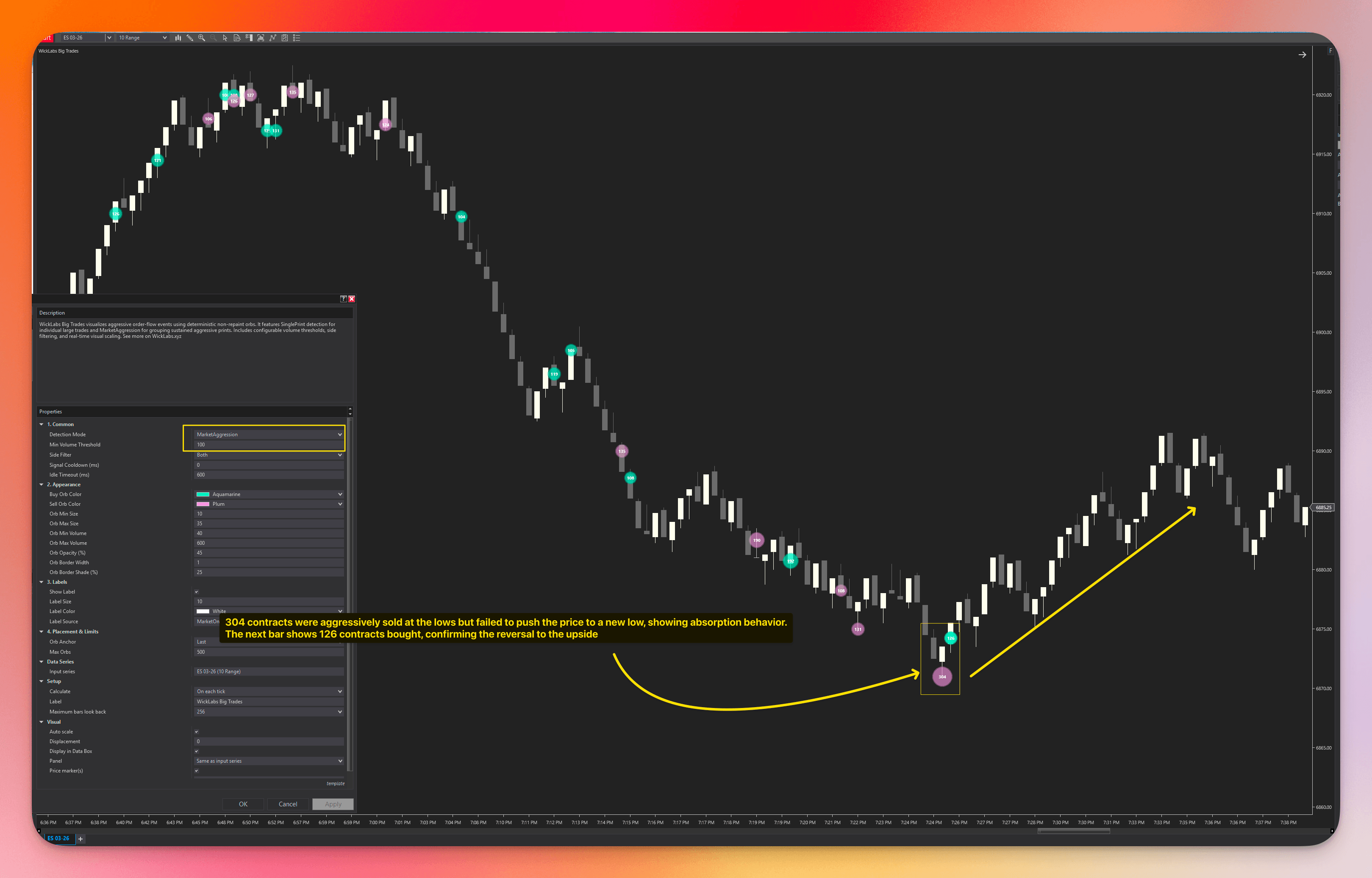
Groups repeated trades at the same price into one event. Built for spotting absorption and sustained pressure at a single level.
Watch this mode lessonSingle block trades, repeated hits at one price, fast directional bursts, and the most-traded price inside each bar.
- 01Impulse Run: Fast directional moves, filtered by how clean and one-sided they were
- 02Price Node: The most-traded price inside a bar, filtered by volume dominance
- 03Single Print: Individual trades above your volume threshold
- 04Market Aggression: Repeated trades at the same price within a time window
- 05One-wayness: Filter out choppy, back-and-forth moves
- 06Front-load: Filter out moves where volume only arrived late
Impulse Run Mode
Impulse Run
Detects fast directional moves, then checks whether they were clean enough. Filters out moves that were too contested, choppy, or slow to develop.
Watch this mode lessonBase Logic
Structural controls decide whether the move was fast enough and large enough to even be considered.
Advanced Gates
Three checks: did the other side fight back too much, did price move cleanly, and did volume arrive early?
Counter-Volume Ratio
Caps how much opposite-side market volume is allowed relative to the directional side. Lower values keep cleaner one-sided bursts and reject moves that met too much resistance.
One-Wayness
Measures directional efficiency as directionalTicks / totalPathTicks. Higher values keep straighter drives and reject bursts that only got there through messy back-and-forth travel.
Front-Load Ratio
Measures urgency as earlyDirectionalVolume / totalDirectionalVolume. Higher values keep explosive starts and reject moves where the volume only arrived later in the burst.
Price Node Mode
Price Node
Finds the most-traded price inside a completed bar, filtered by volume dominance. Only prints when that level was truly concentrated, not when volume was spread thin.
Watch this mode lessonCore Logic
A filtered micro-POC for each bar.
Quality Gates
The node must pass both a minimum volume threshold and a dominance ratio. Only concentrated levels stay on the chart.
Node Dominance
Measures how much of the bar's selected basis belonged to the winning node. Higher values require more concentrated acceptance.
Best Use
Enable Zones to keep accepted levels visible after the bar closes. Useful for intraday support and resistance on any liquid futures instrument.
Single Print Mode
Single Print
Detects one large trade at one price. No aggregation, no blur.
Watch this mode lessonMarket Aggression Mode
Market Aggression
Groups repeated trades at the same price into one event. Built for spotting absorption and sustained pressure at a single level.
Watch this mode lessonThe free version uses Bid/Ask only. PRO adds Up/Down Tick and Adaptive, which falls back automatically when quote data goes stale.
- 01Bid/Ask: Classifies trades from execution price versus the inside quote and remains the fixed method in the free version
- 02Up/Down Tick: Classifies from trade-to-trade price direction, useful when you want quote-independent behavior
- 03Adaptive: Uses Bid/Ask while quotes are fresh, then automatically falls back to Up/Down Tick when quote updates go stale
Project major order-flow events forward as configurable support and resistance structure. Zones can be turned on or off, padded for single-price signals, extended for a chosen number of bars, and styled independently for buy and sell context.
- 01Range-aware construction: MarketAggression and ImpulseRun use the event's natural high/low, while SinglePrint and PriceNode use configurable Zone Padding around the anchor price
- 02Three consumption models: choose wick touch, body entry, or full cross-through before a zone is considered consumed
- 03Extension control: stop the zone exactly on consumption or keep projecting it forward up to your chosen Zone Max Bars limit
- 04Independent styling: tune buy color, sell color, and opacity so zones stay readable without overpowering the chart
Big Trades Zones: project event ranges forward as support and resistance.
A live Stats tab inside the settings window shows how your active detection engine is behaving on the current instrument and bar type — over the last N bars or the current session — so you tune to what the chart is actually printing instead of copying generic presets.
- 01Candidate baselines: the volumes, ranges, and ratios the engine saw before any gate was applied, shown with distribution bars
- 02Gate outcomes: how many candidates each gate rejected, so you can see exactly which threshold is doing the filtering
- 03Emitted-orb baselines: the size and volume distribution of the orbs that actually rendered
- 04One-click AI calibration prompt: copies your live stats into a ready-made prompt for ChatGPT, Claude, or any LLM
- 05Window control: scope the stats to the last N completed bars or the current session, and the choice persists across reloads
Calibration Lab: live engine stats plus a one-click AI calibration prompt.
Paste it into ChatGPT or Claude and get a specific, evidence-based calibration read back.
A button on the chart toolbar opens a dedicated Big Trades PRO settings window — the same fast workflow as WickFlow and Volume Profile Suite PRO. Adjust the indicator without reopening NinjaTrader's heavy properties dialog, and apply most visual changes instantly.
- 01Apply Refresh: colors, sizes, opacity, shapes, and zones apply instantly on the chart with no reload
- 02Every setting in one place, grouped and documented, without digging through the NT8 property grid
- 03Orb shapes: draw orbs as circles, squares, or diamonds to tell detection modes apart across chart instances
- 04Hover breakdown panels: a readable detail panel appears on hover (or always), with full font, padding, and color control
- 05License and Calibration tabs live in the same window, so activation and tuning are a click away
Dedicated settings window: fast, toolbar-accessible, with instant Apply Refresh.
Hover breakdown panels: full detail only when you point at an orb.
Use Big Trades PRO outputs in NinjaTrader's Strategy Builder or your own scripts.
- 01Strategy Builder integration: pick signal plots directly in conditions
- 02Coded NinjaScript support: use exposed plots for programmatic access
- 03Strategy-ready outputs: use mean reversion and momentum logic in automation
- 04Supports NinjaTrader Strategy, Strategy Builder, and third-party tools
Big Trades PRO: Detection Modes, Zones & Chart Settings | NinjaTrader 8
Free Edition vs PRO
What you get when you upgrade from the free edition.
Feature Comparison
Don't buy one indicator. Own the suite and keep $319.96 in your pocket.
Buying all five separately costs $999.95. Get the complete bundle for $679.99 (lifetime), or subscribe for $89.99/mo.
Low-friction entry to the full suite. Cancel anytime.
- Cancel anytime
- All 5 indicators included
Pay once, own forever. Includes all updates.
- One-time payment
- All future updates free
- All 5 indicators included
One price. Lifetime access.
No subscriptions. No tiers. No hidden fees. Pay once, keep every engine and every future update.
Big Trades PRO Lifetime License
- Impulse Run: filtered momentum detection (PRO only)
- Price Node: filtered bar-level most-traded price (PRO only)
- Big Trades Zones: forward-projected support/resistance (PRO only)
- Calibration Lab with one-click AI tuning prompt (PRO only)
- Dedicated settings window with instant Apply Refresh (PRO only)
- Single Print and Market Aggression (shared with free)
- Up/Down Tick and Adaptive classification (PRO only)
- Strategy Builder integration (PRO only)
- Optional sound alerts with scanned WAV picker (PRO only)
- 2,000 bubble capacity (vs 500 in free)
- Volume-scaled bubbles with custom labels
- Lifetime access, no subscriptions
- Comprehensive documentation included
Full functionality. No credit card required.
Disclaimer: WickLabs software is provided "as is" for educational purposes only. It is not financial, investment, or trading advice. See our Terms of Service and Disclosures for full details.
NinjaTrader® is a registered trademark of NinjaTrader Group, LLC. No NinjaTrader company has any affiliation with the owner, developer, or provider of the products or services described herein.
What Traders Say
Hear from traders who use Big Trades PRO in their daily workflow.
Latest Updates
We ship fast. Here's what's new in Big Trades PRO.
- • Max Volume Threshold: Added an optional upper volume filter alongside Min Volume Threshold. Set it to
0for no cap, or enter a positive value to keep only events inside an inclusive volume range. For example, Min70and Max190keeps events from 70 through 190 contracts while filtering larger clearing or hedging prints. - • The new setting is available in both the native NinjaTrader properties and the Big Trades PRO custom settings window, with reload guidance and active-engine volume explanations.
- • The Calibration Lab shared volume gate now reports the combined minimum/maximum range when a maximum is enabled.
- • Dedicated Settings Window (PRO): New chart toolbar button that opens a dedicated Big Trades PRO Settings window - change settings without digging through the NinjaTrader indicator dialog. Same fast-settings workflow as WickFlow and Volume Profile Suite PRO.
- • - Apply Refresh: visual settings (colors, sizes, opacity, shapes, zones) apply instantly on the chart, no chart reload needed.
- • All four detection engines now report candidate and gate statistics to the Calibration Lab. Detection behavior itself is unchanged.
- •
Orb Opacity (%)was relabeled Orb Fill Opacity (%) (same underlying property - saved templates are unaffected).
- • Diagnostics Mode setting - superseded by the Stats tab (it remains as an internal dev-only flag).
- • Sound Alerts (PRO): Optional NinjaTrader alert sound when a visible PRO bubble is created in realtime.
- • - Added Enable Sound Alerts master toggle (default off).
Big Trades PRO FAQ
Complete settings reference covering behavior logic and rules.
Setup instructions ensures perfect tick matching.
Everything you need to get started.
The knowledge base explains every feature, limit, and mode so you know exactly what each bubble means.
Tick replay, data feeds, and the differences between detection modes.
Every algorithm property, threshold, and visual control.
Access to the full knowledge base is provided upon trial activation.
See where the volume was.
Block trades, filtered bursts, and repeated hits at one price — shown as volume-scaled bubbles with optional forward-projected zones.