Cumulative Delta PRO
Delta Divergence, Automated
Automated Divergence · Three Swing Engines · Momentum Early Warning · Size Filtering · No Orderflow+ Required
CVD PRO calculates delta from every tick using real Bid/Ask data. It automatically detects Regular and Hidden divergences across three structural swing engines and paints them directly on your chart. Built for NinjaTrader 8, no Orderflow+ subscription required.
Spot the Delta
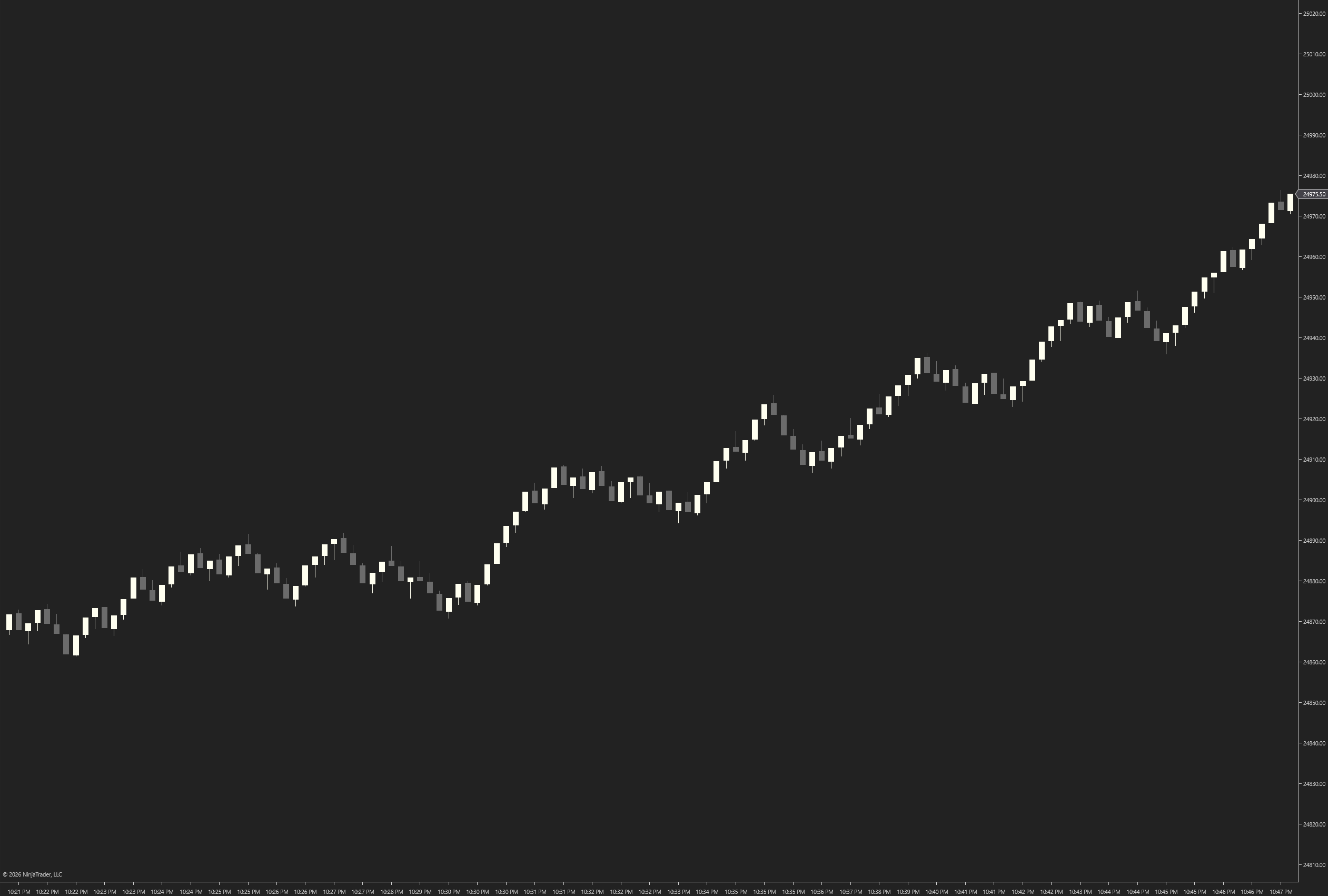
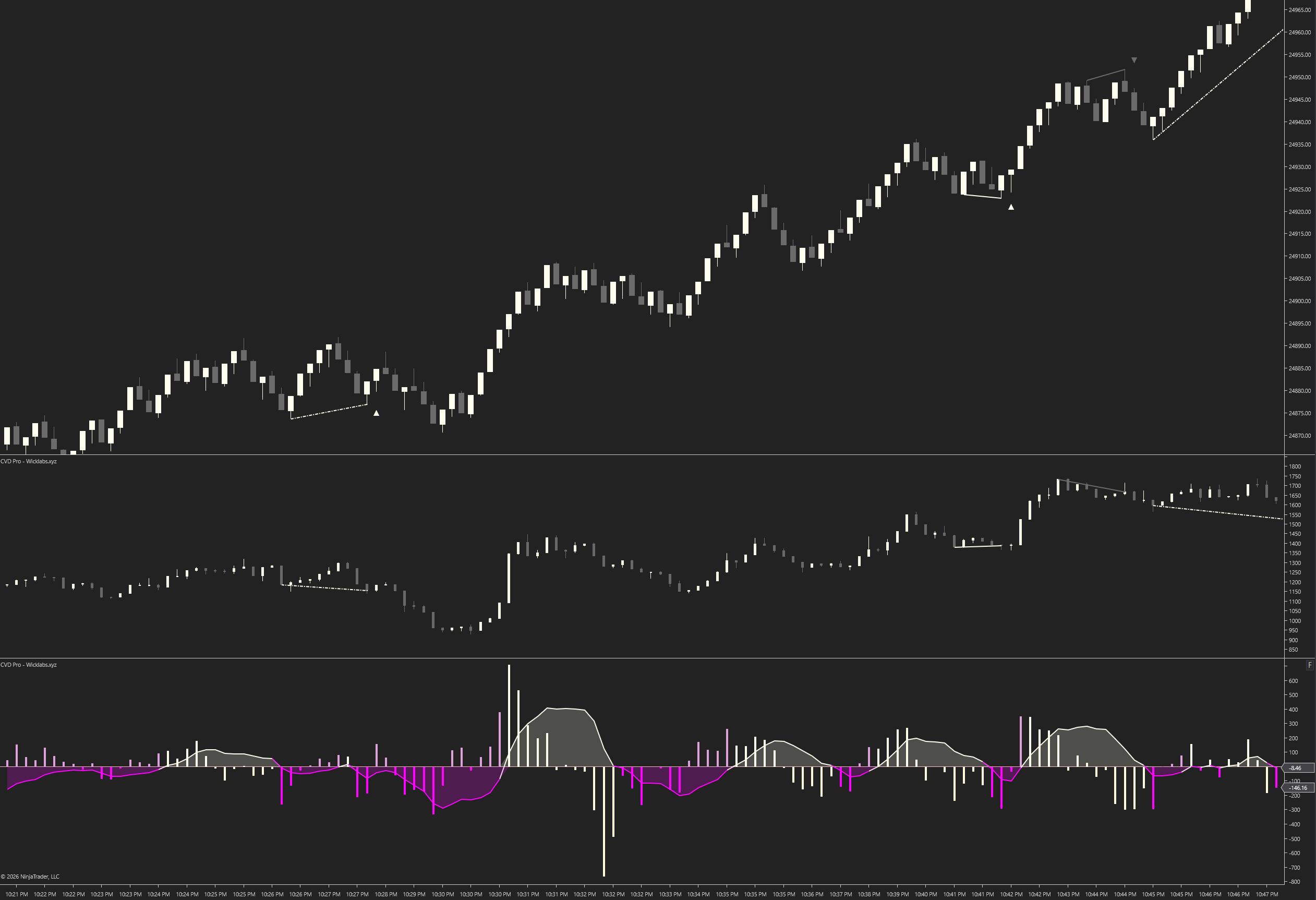
Slide to see what price action alone hides. CVD PRO reveals when volume tells a different story than price.
Flying Blind
Standard candle charts hide the balance of trade. You see a low, but you don't see that sellers are actually exhausted.
Total Transparency
CVD PRO reveals that despite new lows or highs in price, the delta is not confirming the move. This identifies a significant volume divergence.
CVD PRO / Start here
Read the flow before tuning the signal
Start with the complete CVD reading and chart setup lesson. Then use the feature panels below to jump directly into divergence, momentum, resets, filters and display controls.
Cumulative Delta Explained & Chart Setup | CVD PRO for NinjaTrader 8
Most delta tools make you spot divergences manually.
Most cumulative delta tools just plot a raw volume line. They force you to manually compare delta slopes to price action, guess whether a swing is structurally significant, and constantly check for hidden divergences.
Cumulative Delta PRO automates the heavy lifting. Three distinct structural swing engines (Fractal, Adaptive ATR, and ZigZag) automatically detect and paint Regular and Hidden divergences directly on your chart, while a dedicated Momentum ROC engine highlights changes in classified delta momentum alongside price.
Why manual divergence hunting fails
Standard tools also use rigid, one-size-fits-all logic. But a 10-tick pullback in ES requires different swing logic than a 50-tick pullback in NQ. Without adaptable structural engines, your divergence signals become unreliable.
Automated divergence detection. Adaptive structural engines.
Three Structural Engines. One Divergence Signal.
CVD PRO brings professional orderflow tools to every NinjaTrader license tier. Orderflow+ is not required.
See how each engine works on your chartBid/Ask Core
Divergence Engine
Momentum Engine
Session Lifecycle
Visual Modes
Trade Size Filter
Tick Replay Guard
Swing Logic
Strategy Automation
Settings Window
View full capability reference
Bid/Ask Core
Divergence Engine
Momentum Engine
Session Lifecycle
Visual Modes
Trade Size Filter
Tick Replay Guard
Swing Logic
Strategy Automation
Settings Window
Professional Orderflow Deconstructed.
CVD PRO isn't just a line on a chart. It's a suite of professional analysis engines working together to give you the most accurate volume footprint in NinjaTrader.
Bid/Ask Core Calculation
The heart of orderflow accuracy. Unlike standard delta indicators that use simple UpDownTick heuristics, CVD PRO uses true Bid/Ask classification on every tick to ensure your delta matches the real-market reality.
- 01Tick-accurate Bid/Ask classification for every trade
- 02Filtered delta ignores inside-spread noise for cleaner calculations
- 03Mandatory Tick Replay guard ensures historical data integrity
- 04Ultra-low CPU overhead for high-velocity liquid markets
Bid/Ask Delta Split on candlestick view
Cumulative Volume Delta Panel Mode View
Automated detection of both Regular and Hidden divergences. Regular signals potential reversals, while Hidden signals trend continuation. These are painted directly on your chart so you can stop eyeballing volume peaks.
- 01Four distinct detection modes: Regular Bullish/Bearish and Hidden Bullish/Bearish
- 02Advanced fractal swing pairing with configurable tolerance
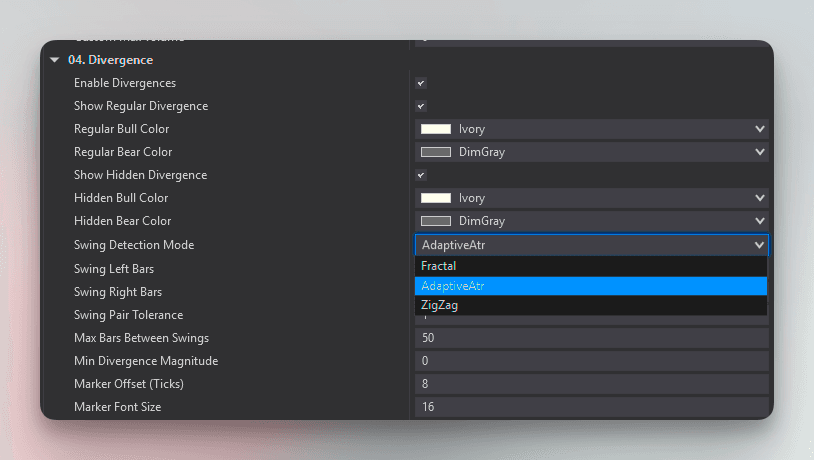
- 03Adaptive mode uses ATR-based lookback for volatility-aware detection
- 04ZigZag pivot mode for strictly price-driven structural divergence
- 05Choose completed-bar CVD closes or CVD highs/lows for divergence comparisons and matching line anchors
- 06Compare ZigZag pivots with up to 20 earlier same-type pivots, with an optional maximum distance in bars
Three Engines. One Goal.
CVD PRO is the only indicator that gives you three distinct structural detection modes to match your specific trading style.
Fractal Engine
Classic price action swings using fixed left/right bar counts. Perfect for rigid structural strategies.
Adaptive ATR
Dynamically scales swing detection by ATR volatility. Stays tight in chop and widens during trends.
ZigZag Structure
Uses point or percentage-based price reversals to define swings. Maximum structural precision.
Fractal Engine: Classic price-action swing pairing using fixed left/right bar counts for structural divergence detection.
Adaptive ATR Mode: Swing lookback scales dynamically with market volatility — tight in chop, wide during trends.
ZigZag Pivot Mode: Point or percentage-based price reversals drive strictly structural divergence detection.
Detection Control: Full granularity over swing thresholds, tolerance pairing, and marker visualization.
Track the speed of the flow. The momentum engine calculates the Rate of Change and Acceleration of delta, helping you spot when buying or selling pressure is fading before price actually turns.
- 01Smoothed ROC (Rate of Change) line for trend identification
- 02Delta Acceleration histogram for spotting early exhaustion
- 03Zero-cross detection for sentiment flip verification
- 04Dual-fill visual mode for intuitive momentum reading
Momentum Analysis: The ROC line crossing zero as delta acceleration fades. This signals trend exhaustion before price turns.
Focus on the executions that matter to your setup. Filter the CVD panel to show trades from specific size buckets, allowing you to follow large-lot flow or compare it with total delta.
- 01Four pre-configured size buckets (Small, Medium, Large, High-Volume)
- 02Fully custom min/max trade size filters for granular control
- 03Multi-mode visualization: CVD Candles, Line, or Delta Histograms
- 04Instantly switch between total and filtered delta perspectives
Automate your orderflow entries. CVD PRO exposes divergence signals, momentum levels, and delta values as NinjaTrader plots, making it easy to build strategy logic around flow exhaustion.
- 01Signal plots for automated divergence: trigger on Reg/Hidden Bullish or Bearish
- 02Momentum automation: use ROC and Acceleration in Strategy Builder conditions
- 03Coded NinjaScript access: public Series properties and NaN filtering
- 04Supports NinjaTrader Strategy, Strategy Builder, and third-party tools
Session Resilience
Cumulative Delta is only as good as its reset logic. CVD PRO gives traders a much cleaner way to reset by RTH, ETH, custom session, custom time, or calendar period.
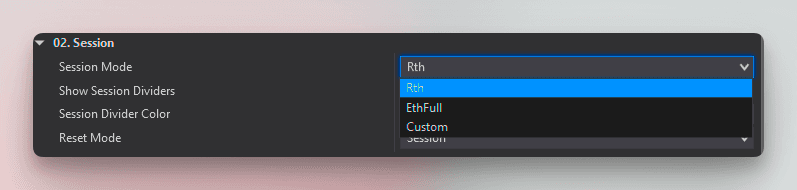
Reset at session open, keep it continuous, or use custom-time and period resets.
Low Latency Architecture
Built for speed on liquid sessions. High-performance calculations with minimal CPU footprint.
Data Integrity Layer
Mandatory Tick-Replay verification ensures historical data reflects real-market orderflow.
Dynamic Rendering
Visual elements adjust spacing automatically to maintain clarity regardless of chart zoom.
Every setting is badged: green [REFRESH] applies instantly, orange [RELOAD] rebuilds core CVD history.
Pending changes are counted on both buttons, so nothing is applied by accident or silently forgotten.
Configure CVD Pro from its own window instead of hunting through the NinjaTrader property grid. Each instance gets its own toolbar button, every field is explained in plain English, and most changes apply instantly without recalculating your delta history.
- 01Own toolbar button per instance: CVD-D for divergence, CVD-M for momentum
- 02Five tabs: Mode & Display, Divergence, Momentum, Session & Reset, License
- 03[REFRESH] settings apply instantly and preserve cumulative delta history
- 04Only reset-boundary and trade-filter changes require a chart reload
- 05Only the controls that apply to your selected engine are shown
One button per instance, labelled by what it measures.
Mode & Display: pick what the instance measures, then how the CVD panel is drawn.
Divergence: Fractal, Adaptive ATR, and ZigZag as guided cards, showing only the controls that apply.
Momentum: layers, calculation periods, colors, and area fill in one place.
Cumulative Delta Explained & Chart Setup | CVD PRO for NinjaTrader 8
Don't buy one indicator. Own the suite and keep $319.96 in your pocket.
Buying all five separately costs $999.95. Get the complete bundle for $679.99 (lifetime), or subscribe for $89.99/mo.
Low-friction entry to the full suite. Cancel anytime.
- Cancel anytime
- All 5 indicators included
Pay once, own forever. Includes all updates.
- One-time payment
- All future updates free
- All 5 indicators included
One price. Lifetime access.
No subscriptions. No tiers. No hidden fees. Pay once, keep every engine and every future update.
Cumulative Delta PRO Lifetime License
- Tick-Replay Accurate Bid/Ask Core
- Automated Regular Divergence
- Automated Hidden Divergence
- Multiple Structural Engines (Fractal, Adaptive ATR, ZigZag)
- Professional Momentum Engine (ROC & Acceleration)
- Size Filtering
- Multiple Visual Modes (Bars, Line, Histogram, Dual)
- Full NinjaTrader Strategy & Builder automation support
- Lifetime access & no monthly subscriptions
- Comprehensive documentation included
Full functionality. No credit card required.
Disclaimer: WickLabs software is provided "as is" for educational purposes only. It is not financial, investment, or trading advice. See our Terms of Service and Disclosures for full details.
NinjaTrader® is a registered trademark of NinjaTrader Group, LLC. No NinjaTrader company has any affiliation with the owner, developer, or provider of the products or services described herein.
What Traders Say
Hear from traders who use Cumulative Delta PRO in their daily workflow.
Latest Updates
We ship fast. Here's what's new in Cumulative Delta PRO.
- • Improved chart stability during live CVD updates.
- • CVD keeps updating when you switch workspaces or minimize a chart.
- • Live CVD previews update more smoothly during fast markets.
- • Optional ZigZag Price Structure Filter skips divergence pairs when intervening price pivots break the endpoint rule. Off by default. Find it under CVD-D → Divergence → ZigZag, below ZigZag Max Comparison Bars, then click Apply Refresh.
Cumulative Delta Divergence FAQ
Mode & Display tab
Divergence tab
Everything you need to get started.
Every setting in Cumulative Delta PRO is fully documented. From configuring delta thresholds to choosing between session and custom reset modes, the knowledge base has you covered.
Delta interpretation, reset modes, display settings, and tick replay requirements answered in full.
Every parameter explained with practical context so you know exactly what you're configuring and why.
Access to the full knowledge base is provided upon trial activation.
Three Engines. Every Divergence. Zero Guesswork.
Automated Regular and Hidden divergence detection across three structural swing engines. Momentum ROC tracks fading flow before price turns. One-time purchase, lifetime updates.