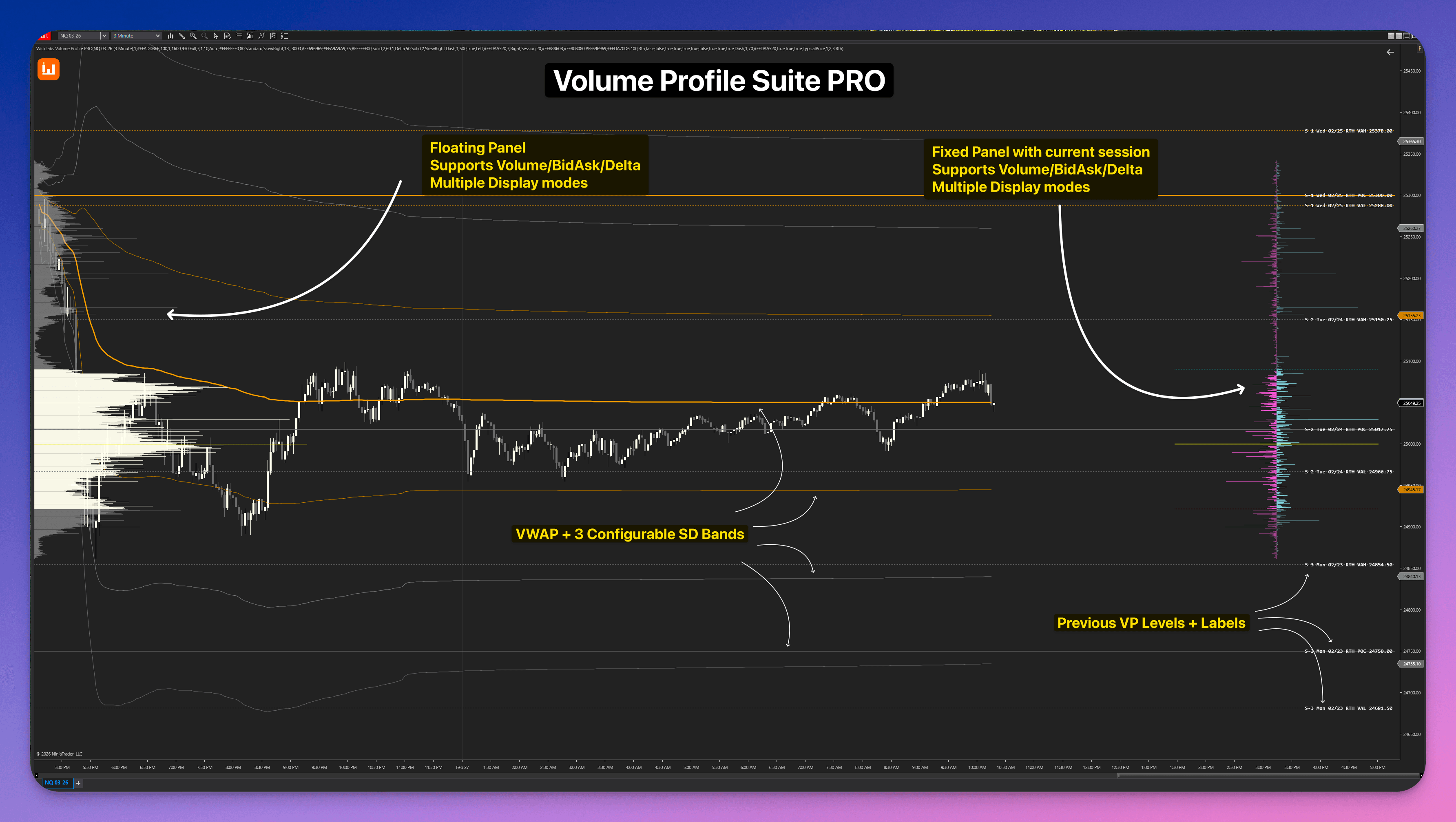
Volume Profile Suite PRO
O kit de ferramentas completo de Perfil de Volume e Delta para NinjaTrader 8.
Perfis Flutuantes · Perfil de Delta · Perfil de Delta Ancorado · Painel Fixo · VWAP Ancorado · Bid/Ask · Detecção HVN & LVN
O Volume Profile Suite PRO é um kit completo de análise de volume e delta para NinjaTrader 8. O sistema oferece perfis de sessão, compostos, diários, semanais, mensais, de rolagem, baseados em barras e totalmente carregados, um painel de sessão ao vivo fixado na tela, VWAP de sessão com 3 bandas de desvio padrão e modos de divisão Bid/Ask e Perfil de Delta puro precisos por ticks. Estão incluídos um painel de configurações dedicado, detecção automática de High/Low Volume Nodes (HVN & LVN) e as ferramentas de desenho de Perfil de Delta e VWAP ancorados, tudo em um único add-on. VWAP semanal e mensal opcionais com cores e bandas de desvio próprias.
Onde o Volume Realmente Foi Negociado
Cada contrato é registrado ao preço onde realmente foi negociado. Volume total, split bid/ask ou delta líquido — sessão, semanal, mensal, qualquer intervalo personalizado, não importa. Os perfis flutuantes rolam com seu gráfico. O painel ao vivo fica fixo na sua tela. As ferramentas ancoradas pegam qualquer intervalo que você jogar nelas. Tudo dados de tick, sem estimativas.
Volume Profile PRO: Read the Session | Profiles, Value Area, Delta & VWAP
A suíte de orderflow definitiva: perfis históricos flutuantes, painel de sessão fixo em tempo real e a ferramenta de desenho ancorada de precisão.
Pare de desorganizar seu NinjaTrader com cinco indicadores de perfil diferentes.
Os traders costumam encadear uma confusão infinita de componentes separados: um add-on para o perfil de sessão, outro para um painel delta fixo à direita e outra assinatura cara para uma ferramenta ancorada decente.
O Volume Profile Suite PRO elimina isso completamente. Um único pacote vem com perfis flutuantes (com 8 tipos de períodos distintos), um painel de sessão ao vivo fixado na tela, uma janela de configurações dedicada no gráfico, detecção e projeção automática de HVN/LVN, VWAP de sessão com bandas SD e as ferramentas de desenho de VWAP e Perfil de Delta ancorados. Cada componente compartilha o mesmo motor de dados de tick e suporta os modos de exibição Padrão, Bid/Ask e Perfil de Delta de forma independente. VWAP semanal e mensal opcionais com cores e bandas de desvio próprias.
Por que ferramentas de perfil fragmentadas atrapalham
Isso fragmenta o seu fluxo de trabalho e o força a pagar repetidamente por ferramentas que não compartilham dados ou configurações entre os componentes.
Uma única compra. Um add-on de gráfico. Cobertura estrutural completa.
O kit de ferramentas completo de Perfil de Volume e Delta
Opere estrutura de mercado profissionalmente com o kit de ferramentas completo disponível para todas as licenças do NinjaTrader.
Veja como cada engine funciona no seu gráficoPerfis Flutuantes
Painel de Sessão Fixo
Painel de Configurações
VWAP de sessão, semanal e mensal
VWAP Ancorado
Ferramenta de Perfil Ancorado
HVN & LVN (High & Low Volume Nodes)
VP Confluence Zones
Modos de Visualização
Linhas de Referência Estendidas
Inteligência de Sessão
Automação de Estratégias
Ver referência completa de capacidades
Perfis Flutuantes
Painel de Sessão Fixo
Painel de Configurações
VWAP de sessão, semanal e mensal
VWAP Ancorado
Ferramenta de Perfil Ancorado
HVN & LVN (High & Low Volume Nodes)
VP Confluence Zones
Modos de Visualização
Linhas de Referência Estendidas
Inteligência de Sessão
Automação de Estratégias
Eight period types
One engine and the same display modes. Session, calendar, bar, or clock boundaries.
Click a type to see how it works.
Aprenda Volume Profile PRO
Comece pelos perfis, área de valor, Delta e VWAP de sessão; depois aprofunde HVN/LVN, zonas de confluência e as ferramentas de desenho ancoradas.
Volume Profile PRO: Read the Session | Profiles, Value Area, Delta & VWAP
Uma suíte. Cobertura total.
Cada componente vem em um único add-on do NinjaTrader. Sem compras separadas. Sem ferramentas desconectadas. Os perfis flutuantes, o painel de sessão, o VWAP ancorado e a ferramenta de desenho ancorada foram construídos para funcionar em conjunto.
Perfis de Tempo Flutuantes
Perfis de volume renderizados diretamente em seu gráfico, alinhados às velas a que pertencem. Cada período mantém sua estrutura histórica exatamente onde pertence e rola com seu gráfico naturalmente.
- 01Escolha entre perfis de Sessão, Composto, Diário, Semanal, Mensal, Rolagem de N Dias, Cada N Barras e Todos Carregados
- 02Exiba qualquer quantidade de perfis históricos simultaneamente usando o buffer de histórico
- 03Suporte para janela de sessão personalizada: defina seu próprio horário de abertura/fechamento para mercados especializados
- 04Oculte o perfil em desenvolvimento com um único botão para manter a ação do preço ao vivo limpa, enquanto os perfis concluídos e o painel fixado continuam a ser atualizados
Perfis Flutuantes: Perfis de Sessão, Dia, Semana e Mês renderizados diretamente no seu gráfico, rolando com o histórico.
Perfis de volume renderizados diretamente em seu gráfico, alinhados às velas a que pertencem. Cada período mantém sua estrutura histórica exatamente onde pertence e rola com seu gráfico naturalmente.
- 01Escolha entre perfis de Sessão, Composto, Diário, Semanal, Mensal, Rolagem de N Dias, Cada N Barras e Todos Carregados
- 02Exiba qualquer quantidade de perfis históricos simultaneamente usando o buffer de histórico
- 03Suporte para janela de sessão personalizada: defina seu próprio horário de abertura/fechamento para mercados especializados
- 04Oculte o perfil em desenvolvimento com um único botão para manter a ação do preço ao vivo limpa, enquanto os perfis concluídos e o painel fixado continuam a ser atualizados
Perfis Flutuantes: Perfis de Sessão, Dia, Semana e Mês renderizados diretamente no seu gráfico, rolando com o histórico.
Um painel de perfil ao vivo fixado no canto direito da tela. Não importa o quanto você role para trás para revisar o histórico, a estrutura de volume da sessão atual estará sempre visível.
- 01Tamanho do bin totalmente independente dos perfis flutuantes. Configure para a granularidade de ticks de sua preferência
- 02Suporta os modos Padrão, Bid/Ask Split e Delta independentemente da camada flutuante
- 03Valores numéricos de volume ou delta opcionais impressos diretamente dentro das barras
- 04Controles de linha POC e Área de Valor dedicados, separados das configurações de extensão de linhas
Painel de Sessão Fixo: Sempre fixado no canto direito da tela. Role para qualquer lugar no gráfico sem perder a estrutura em tempo real da sessão atual.
Configure seus parâmetros instantaneamente a partir da barra de ferramentas do gráfico. A interface separa opções seguras de atualização de opções que exigem recarregamento, tornando os ajustes rápidos e limpos. Os botões de abas de gráfico inativas ficam esmaecidos e desativados; mudar de aba fecha sua janela de configurações.
- 01Os botões de abas de gráfico inativas ficam esmaecidos e desativados; mudar de aba fecha sua janela de configurações.
- 02Aplique alterações visuais, cores, sobreposições e propriedades de agrupamento sem latência
- 03Legendas visuais explicam abreviações e parâmetros diretamente dentro da janela
- 04Veja claramente quais parâmetros exigem recarga do gráfico histórico antes de aplicá-los
Painel de Configurações Dedicado: Gerencie todos os parâmetros visuais, estilos de linha, opacidades e modos de exibição instantaneamente a partir da barra de ferramentas do gráfico.
O VWAP de sessão e as curvas semanais e mensais opcionais usam a fonte de preço e a janela de sessão escolhidas. Carregue o histórico desde o início do período de negociação.
- 01O VWAP de sessão mantém sua âncora e suas bandas existentes
- 02As curvas semanais e mensais e suas bandas ficam desativadas por padrão; cada período tem sua cor
- 03Três pares de bandas por período usam os multiplicadores SD compartilhados
- 04Cálculo pelas barras carregadas; os valores podem variar com o intervalo
VWAP de Sessão: Reinicia na abertura da sessão com 3 bandas de desvio padrão de cada lado. Modos RTH e ETH incluídos.
Uma ferramenta de desenho independente do NinjaTrader, incluída na sua licença. Coloque-a a partir do menu de ferramentas de desenho e clique em duas velas para gerar instantaneamente um Perfil de Delta ou perfil de volume preciso em qualquer intervalo.
- 01Colocação com dois cliques: defina uma vela de início e de fim; o perfil é gerado imediatamente a partir dos dados das velas
- 02Modo Calcular até a Última Barra: ancore a uma data de início e o perfil continua se estendendo ao vivo com a sessão
- 03Opção Inverter Perfil para espelhar a direção das barras para layouts mais limpos
- 04Quando o indicador principal está ativo, a ferramenta de desenho usa automaticamente os ticks compartilhados para precisão extrema
Ferramenta de Perfil Ancorado: Colocação em dois cliques para gerar um Perfil de Delta preciso em qualquer intervalo. Incluído sem custo adicional.
Um VWAP ancorado completo incluído na sua licença sem custo adicional. Ao contrário do VWAP de sessão que reinicia diariamente, este ancore em qualquer ponto e permanece lá.
- 01Modo de ancoragem: segue a sessão activa (RTH ou ETH), ou trave-o manualmente em qualquer vela
- 02Três bandas de desvio padrão configuráveis com multiplicadores independentes
- 03Opções de fonte de preço: Fechamento, Preço Típico (HLC3) ou OHLC4 para maior precisão de cálculo
- 04Renderizado como plots nativos do NinjaTrader, mantém a sincronia com a escala de preço automaticamente
VWAP Ancorado: Trave em qualquer vela e acompanhe o valor a partir desse ponto. 3 bandas SD com multiplicadores configuráveis.
Detecte e projete níveis estruturais importantes de forma automática. Picos de alto volume destacam zonas de consolidação, enquanto vales de baixo volume identificam áreas por onde o preço passa rápido.
- 01Selecione entre os métodos matemáticos de detecção por Percentil e por Pico & Vale
- 02Projete níveis no gráfico a partir de perfis flutuantes ou do painel fixo
- 03Agrupe níveis adjacentes detectados dinamicamente para manter o gráfico limpo
- 04Retire as linhas projetadas automaticamente no toque do preço ou no fechamento do corpo da vela além do nível
High & Low Volume Nodes: Detecção algorítmica de picos e vales históricos com projeção dinâmica no gráfico e auto-aposentadoria de linhas.
Highlight price areas where levels from multiple completed volume profiles stack near the same price. A common case: yesterday's POC and today's VAH sitting at roughly the same handle.
- 01Groups nearby levels from completed profiles within a configurable tick radius
- 02Minimum Profiles and Minimum Levels filters require real multi-period agreement, not one busy profile on its own
- 03Right-edge labels show how many profiles and levels merged into each zone
- 04Zones can retire on touch or close-through. Scan depth follows your Profile Count and Extended Line Count settings
VP Confluence Zones on a NinjaTrader 8 chart showing a multi-profile agreement zone.
Cada ferramenta da suíte (perfis flutuantes, painel fixo, ferramenta de desenho ancorada) pode ser alternada de forma independente entre três modos de visualização. Leia exatamente o que o mercado está dizendo.
- 01Volume Padrão: estrutura clássica mostrando o total de contratos negociados em cada nível de preço
- 02Split Bid/Ask: separa compras agressivas (no Ask) de vendas agressivas (no Bid) com um layout centralizado
- 03Perfil de Delta Puro: mostra a diferença líquida entre compradores e vendedores em cada preço. Veja instantaneamente onde a dominância mudou
- 04Modos de inclinação (Classic, SkewRight, SkewLeft) para layouts de barras de Bid/Ask ou Delta assimétricos
Modos de Visualização: Padrão, Divisão Bid/Ask e Delta puro aplicados de forma independente a qualquer componente de perfil no gráfico.
Cada perfil fechado pode projetar suas linhas de POC, VAH e VAL para frente. Isso cria uma escada de níveis institucionais que permanecem visíveis conforme a ação do preço se desenvolve, dando a você alvos e zonas de rejeição claros.
- 01Linhas se estendem automaticamente de cada perfil histórico carregado no gráfico
- 02Etiquetas de preço dinâmicas aparecem no final de cada linha para identificação instantânea
- 03Estilo independente: use cores, espessuras e estilos de linha diferentes para POC vs. Área de Valor
- 04Acompanhamento ao vivo: linhas da sessão atual também se estendem em tempo real conforme o perfil se desenvolve
Integre a estrutura de volume diretamente nos seus sistemas automatizados. O Volume Profile Suite PRO expõe os valores de POC, VAH, VAL e VWAP para uso no Strategy Builder do NinjaTrader e no NinjaScript codificado.
- 01Integração com Strategy Builder: escolha plots de POC/VAH/VAL diretamente nas condições
- 02Suporte para NinjaScript codificado: propriedades Series(double) públicas para todos os perfis
- 03VWAP e bandas SD prontos para estratégias: use lógica de reversão à média na automatização
- 04Suporta NinjaTrader Strategy, Strategy Builder e ferramentas de terceiros
Volume Profile PRO: Read the Session | Profiles, Value Area, Delta & VWAP
Três Modos de Visualização Cada Um Conta Uma História
Alterne qualquer componente de perfil para o modo que responde à sua pergunta atual. Combine de forma independente perfis flutuantes, painel fixo e ferramentas ancoradas.
Volume Padrão
Contratos totais negociados por nível de preço. Identifique High Volume Nodes (HVN) e Low Volume Nodes (LVN) que atuam como ímãs ou zonas de rejeição em sessões posteriores.
Divisão Bid/Ask
Volume separado em compras agressivas a mercado (batendo no Ask) de vendas agressivas a mercado (batendo no Bid). Veja qual lado controlou cada nível de preço.
Perfil de Delta Puro
Volume líquido de compra menos volume de venda em cada preço. Delta positivo significa que compradores dominaram. Delta negativo significa que vendedores venceram o fluxo de transações naquele nível.
Construa sua configuração completa WickLabs e economize $319.96
Comprar os cinco separadamente custa $999.95. Obtenha o pacote completo por $679.99 (vitalício) ou por $89.99/mês.
Entrada de baixo custo na suite completa. Cancele a qualquer momento.
- Cancele a qualquer momento
- Todos os 5 indicadores inclusos
Pague uma vez, possua para sempre. Inclui atualizações.
- Pagamento único
- Atualizações futuras grátis
- Todos os 5 indicadores inclusos
Um preço. Acesso vitalício.
Sem assinaturas. Sem níveis. Sem taxas ocultas. Pague uma vez, mantenha cada motor e cada atualização futura.
Volume Profile Suite PRO Licença Vitalícia
- Perfis Flotantes (Session, Composite, Daily, Weekly, Monthly, Rolling, Every N Bars, All Loaded)
- Painel de Sessão Fixo na Tela & Painel de Configurações Dedicado
- Detecção Algorítmica de HVN & LVN com Projeção no Gráfico
- VWAP de sessão, semanal, mensal e ancorado com bandas SD opcionais
- Ferramenta de Desenho de Perfil de Volume & Delta Ancorado Incluida
- Modos de Divisão Bid/Ask e Perfil de Delta Puro Precisos por Ticks
- Linhas de Referência Históricas de POC, VAH e VAL Estendidas
- Suporte Completo para Automação no NinjaTrader Strategy & Builder
- Acesso vitalício, sem assinaturas mensais
- Documentação abrangente incluída
Funcionalidade completa. Sem necessidade de cartão de crédito.
Aviso Legal: O software WickLabs é fornecido "como está" apenas para fins educacionais. Não é aconselhamento financeiro, de investimento ou de trading. Veja nossos Termos de Serviço e Divulgações para detalhes completos.
NinjaTrader® é uma marca registrada da NinjaTrader Group, LLC. Nenhuma empresa NinjaTrader tem qualquer afiliação com o proprietário, desenvolvedor ou fornecedor dos produtos ou serviços descritos aqui.
O que os Traders dizem
Ouça traders que usam Volume Profile Suite PRO em seu fluxo de trabalho diário.
Últimas Atualizações
Nós enviamos rápido. Aqui está o que há de novo no Volume Profile Suite PRO.
- • Added Session Profile Resolution under Session for the Fixed Panel and floating Session profiles. Auto is the default and selects Tick when the primary chart has Tick Replay enabled, or uniform completed-minute estimates in both history and realtime without it. The source hint shows Auto: Tick or Auto: Minute. Minute always uses the same uniform one-minute total-volume estimate in history and realtime. Tick uses trades and requires Tick Replay. Reload the chart after changing it.
- • Kept each published histogram, POC, value area and total volume together as one snapshot, including the last historical replay ticks before realtime begins.
- • Corrected completed-minute accounting and session-boundary callback ordering so duplicate or late callbacks cannot discard or contaminate a new session's opening volume.
- • Optional developing Weekly VWAP and Monthly VWAP alongside Session VWAP, with independent enable switches, colors, and optional three-pair deviation bands. Both periods and their bands default off; existing session VWAP settings remain unchanged.
- • Fourteen higher-period plot outputs for coded NinjaScript and Strategy Builder. Existing plot indices are preserved.
- • VP toolbar buttons now follow their owning chart tab: inactive-tab buttons are disabled and dimmed, and switching away closes that tab's settings window. This matches chart tabs; multiple VP instances on the same tab remain enabled.
- • Added a default-on Show Selected Range outline to the Anchored Volume Profile, making the selected candles easier to identify. Click the border to select the drawing.
- • Corrected anchored profile positioning so normal profiles grow right inside the selected range and Flip Profile grows left from the opposite end, including reversed anchors and Calculate To Last Bar.
- • Corrected centered BidAsk and Delta profile positioning. Volume calculations and POC/VA values are unchanged.
FAQ do Volume Profile Suite PRO
Referência de configuração completa para cada tipo de perfil e modo de exibição.
FAQs cobrindo Tick Replay, limites de sessão e modos de exibição.
Tudo o que você precisa para começar.
Cada configuração da suíte está totalmente documentada. Desde a configuração do tamanho do bin por ativo até a compreensão da diferença entre Bid/Ask Split e modo Delta, nossa base de conhecimento cobre tudo.
Limites de sessão, requisitos de Tick Replay, modos de exibição, colocação da ferramenta de desenho e muito mais.
Cada tipo de perfil, controle de painel, parâmetro de VWAP e modo de exibição explicado com contexto prático.
O acesso à base de conhecimento completa é fornecido mediante ativação do teste.
Pare de adivinhar. Leia a estrutura.
Perfis flutuantes, um painel de sessão fixado, VWAP de sessão, VWAP ancorado e uma ferramenta de desenho de Perfil Delta Ancorado. Tudo em um único add-on do NinjaTrader 8. Compra única, atualizações vitalícias, sem taxas mensais.