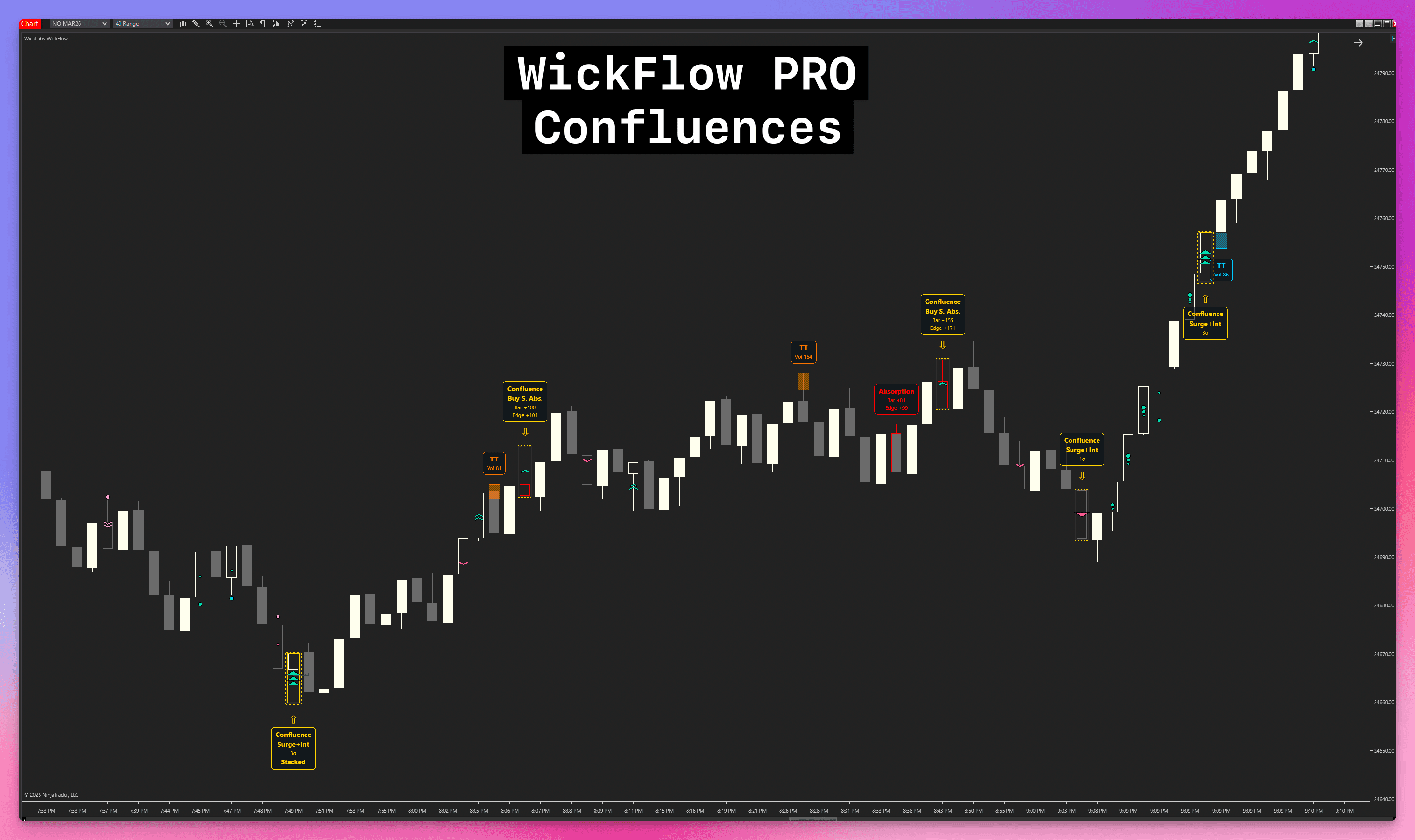
WickFlow PRO
Order flow clarity without the footprint complexity.
8 engines. Trapped traders. Absorption. Stacked imbalances. Surge momentum. Delta flips. Built-in calibration stats.
WickFlow reads raw bid/ask data tick by tick and marks what matters on your candles. Its Calibration Lab shows how your settings compare to recent market behavior, so you can tune every engine to your chart instead of copying generic presets.
Orderflow, simplified
You do not need a wall of numbers to trade orderflow. WickFlow reads the tick data and marks what matters right on your candles. Trapping. Absorption. Surges. All of it on the chart, where your price action is.
WickFlow for NinjaTrader 8 — Order Flow on Your Candle Chart
The WickFlow Confluence System: highlighting when multiple underlying orderflow factors agree.
Stop fighting the footprint.
Staring at a wall of numbers leads to analysis paralysis. Trading orderflow shouldn't feel like a data-entry job.
WickFlow does the arithmetic. Tick by tick, it checks for trapped participants, absorption walls, and momentum shifts, then marks them on the chart. You trade the picture, not the spreadsheet.
Why footprints fail most traders
WickFlow translates dense tick data into visual events. Spot heavy trapping and absorption without losing sight of your price action.
Simple visualization. Complex mathematics.
Eight engines on your chart
Tap an engine below for screenshots and settings — or jump straight to the deep dive.
See how each engine works on your chartTrapped Traders
Absorption
Stacked Imbalances
Surge & Intensity
Delta Participation
Delta Flips
Unfinished Business
Volume & Delta POCs
Confluence System
View full capability reference
Trapped Traders
Absorption
Stacked Imbalances
Surge & Intensity
Delta Participation
Delta Flips
Unfinished Business
Volume & Delta POCs
Confluence System
Calibrate Order Flow Settings in NinjaTrader 8 | WickFlow Stats
The rare orderflow indicator that helps you tune itself
Most indicators give you thresholds and leave you guessing. WickFlow compares your current settings to recent completed bars, then explains whether each gate is loose, calibrated, selective, or rare for the market in front of you.
Orderflow thresholds are not universal. A setting that is clean on NQ during the open can be useless on ES at lunch or on a different bar size.
The Calibration Lab makes that visible immediately. It reads the selected completed-bar window, compares your thresholds to the actual baseline, and tells you which engines are too loose, too strict, or aligned.
This means WickFlow does not just detect orderflow. It assists the tuning workflow, helping you match the indicator to your trading style, instrument, and session without blind trial and error.
WickFlow Calibration Lab inside the toolbar settings window
See the calibration workflow inside the product
The current Stats panel walks from market scale to health checks to signal density, so you can tune one engine at a time and verify the result. It also generates a tailored AI prompt from your current baseline so you can feed it to ChatGPT, Claude, or Gemini and surface exact tuning recommendations.
Market scale first
Average volume, range, delta, wick size, and speed show what normal looks like before you change a threshold.
average bar volume, range, duration, delta, volume per price level, and wick size.
Health checks
Delta landscape and volume gates label your current settings as loose, calibrated, selective, rare, or wider than the typical wick.
Volume Gates: whether your current delta, volume, range, and zone gates are loose, calibrated, selective, or rare.
Tuning Math: plain-language tuning notes for Trapped Traders, Absorption, Stacked Imbalances, Surge, and the other engines.
Density Feedback: how often each engine has fired recently, so you can catch settings that are silent or too noisy.
AI Calibration Generation
One button generates a prompt pre-filled with your market baseline and engine settings.
generates a ready-to-use prompt from your current market baseline and engine settings, so you can paste it into ChatGPT, Claude, Gemini or any LLM and get exact threshold recommendations based on your trading style and instrument.
Dedicated Settings Interface
WickFlow replaces the default NinjaTrader property grid with a dedicated interface. Accessible instantly from the top chart toolbar via the WF button, it groups engine parameters directly alongside their documentation, so you don't need to look up external guides to understand how an engine triggers or what specific chart tags mean.
The interface explicitly identifies which settings require a full historical chart reload. Many engine thresholds, sensitivity filters, and all visual toggles can be applied instantly via the [REFRESH] system, preventing unnecessary chart recalculations. Two pre-built instrument templates for NQ 40R and ES 10R NY Session (RTH) are included and accessible from the Engines tab.
- Refresh-Safe Toggles: Adjust sensitivities, filter settings, and display styles without reloading the chart.
- Inline Documentation: View engine conditions and parameter tags directly inside the properties window.
- Dynamic Pre-built Templates: Toggle index future settings optimized for NQ 40R and ES 10R instantly.
Engine logic and algorithmic conditions are documented exactly where you configure them.
Acronyms and chart tags are explicitly explained in the indicator's visual legends section.
Learn WickFlow
Start with Stats, then explore each engine with chart examples and settings.
Calibrate Order Flow Settings in NinjaTrader 8 | WickFlow Stats
Inside the Architecture
Eight engines, each reading a different facet of orderflow. They all run independently on every tick. Trapped traders, absorption, imbalances, surge momentum, delta flips, failed auctions. Then the Confluence System cross-checks them all and marks the bars where multiple forces agree.
Trapped Traders
A bar spikes, prints a wick, and reverses hard. Somebody bought the top or shorted the bottom. This engine measures how much bid or ask volume clustered at the bar's extreme before price turned, then marks the zone where those traders are now underwater.
- 01Active Trader Profiling: Differentiates between passive liquidity and active participants by scanning aggressive volume, eliminating false signals from heavy absorption.
- 02Concentration Thresholds: Define the exact percentage of volume required to form the trapped zone, wrapping visually around the specific price range where traders are offside.
- 03Structural Gates: Configure minimum bar ranges and zone separation to ensure the caught volume is significant and separated from the bar close.
- 04Minimum Volume Filtering: Set exact minimum thresholds for offside volume to filter out low-liquidity noise during quiet periods.
Trapped Traders - Chart view
Trapped Traders - Configuration parameters
A bar spikes, prints a wick, and reverses hard. Somebody bought the top or shorted the bottom. This engine measures how much bid or ask volume clustered at the bar's extreme before price turned, then marks the zone where those traders are now underwater.
- 01Active Trader Profiling: Differentiates between passive liquidity and active participants by scanning aggressive volume, eliminating false signals from heavy absorption.
- 02Concentration Thresholds: Define the exact percentage of volume required to form the trapped zone, wrapping visually around the specific price range where traders are offside.
- 03Structural Gates: Configure minimum bar ranges and zone separation to ensure the caught volume is significant and separated from the bar close.
- 04Minimum Volume Filtering: Set exact minimum thresholds for offside volume to filter out low-liquidity noise during quiet periods.
Trapped Traders - Chart view
Trapped Traders - Configuration parameters
Price pushes toward a level with force, then stops cold. Somebody absorbed it. This engine checks for delta divergence at the bar's turning point to confirm a passive wall absorbed the aggressive move. When it spots clustering across multiple bars, it upgrades to strong absorption and projects the zone forward.
- 01Smart Validation: Checks for bar delta divergence combined with edge-zone delta validation to confirm absorption at the bar's turning point.
- 02Visual Clustering: Automatically upgrades isolated absorption events into 'Strong Absorption' signals when they cluster within a configured window.
- 03Support & Resistance Zones: Projects confirmed strong absorption levels forward as shaded zones, highlighting areas where heavy orders previously held the line.
- 04Custom Zone Retirement: Choose how the projected zones are removed, either on the first touch or after a decisive close through the level.
Absorption - Chart view
Absorption - Configuration parameters
Not just one price level with more buyers than sellers. This engine looks for consecutive levels where the imbalance stacks in the same direction, level after level. That is a genuine wall. It projects those stacked levels forward as support and resistance zones that persist until price breaks through.
- 01Market Ladder Scanning: Scans the entire price ladder to catch cascading imbalances that standard volume profiles often miss.
- 02Adjustable Ratios: Fine-tune the precise imbalance ratio required to flag a single price level, giving you control over how strictly buying or selling pressure must outpace the opposite side.
- 03Consecutive Level Validation: Choose exactly how many consecutive imbalanced levels are needed to validate a genuine wall rather than a temporary spike.
- 04Historical Projections: Projects semi-transparent rectangles forward from the stacked levels, acting as dynamic support and resistance zones that persist until structurally compromised.
Stacked Imbalances - Chart view
Stacked Imbalances - Configuration parameters
Before price moves, participation shifts. WickFlow watches for it through two independent gates. Magnitude: delta expands and aggressive trade size spikes well above recent history. Intensity: volume per second surges with directional agreement, even if individual trade sizes stay normal. When a bar clears either gate and the late-half acceleration confirms, WickFlow marks a Speed Surge.
- 01Magnitude Gate: Requires both delta expansion and unusually large aggressive trade sizes relative to recent history, preventing noisy chop from triggering false surges.
- 02Intensity Gate: Adds a second path that looks for unusually high volume-per-second with directional delta agreement, catching fast crowd urgency that would be missed by pure trade-size logic.
- 03Acceleration Tracking: After a bar already qualifies as Magnitude or Intensity Surge, WickFlow splits its internal trade-flow timeline into an early half and a late half and checks whether enough winning-side directional delta arrived late enough to confirm a true 'Speed Surge'.
- 04Visual Separation: Magnitude surge keeps the directional chevrons, while intensity surge uses a distinct internal speed-line treatment so you can tell heavy participant force apart from rapid participation at a glance.
Surge, Intensity & Speed - Chart view
Surge, Intensity & Speed - Configuration parameters
Price makes a swing. Then it pulls back. Is the pullback weak, or is this a genuine reversal? This engine compares cumulative delta from the previous swing to the current one. If delta is smaller despite price moving further, that is exhaustion. If it is larger in the opposite direction, that is capitulation. Every bar gets a hover label with exact delta numbers.
- 01Swing-to-Swing Comparisons: Connects delta behavior directly to price action by comparing the total cumulative delta of sequential swings, identifying progressive weakening or strengthening of trends.
- 02Structural Qualifiers: Built-in strict filters analyze whether the current swing is a valid pullback, check for underlying absorption at the pivot, and calculate delta-per-tick efficiency before highlighting an event.
- 03Custom Zig-Zag Calibration: Fully control the underlying mechanical swing detection by defining the exact tick deviation and lookback period required to confirm valid structural pivots.
- 04Total Delta Visibility: Hover-labels reveal the exact numerical delta of the current swing compared to the previous, putting hard numbers behind the 'weakness' or 'strength' assessment.
Delta Participation - Chart view
Delta Participation - Configuration parameters
A bar prints with opposing delta. The next bar prints with aggressive participation in the candle's direction. That flip is a sentiment reversal. WickFlow marks it immediately, independent of the swing engine, so you see the shift as it happens.
- 01Quick Reversal Logic: Detects patterns where a bar with opposing delta is immediately followed by aggressive participation in the direction of the candle.
- 02Volume Filters: Ensures the flip isn't just noise by making sure both bars meet a minimum volume threshold.
- 03Visual Alerts: Paints a clear marker on the exact bar where the sentiment flips, giving you a heads-up that participation has reversed.
- 04Fast Detection: Operates independent of the broader swing engine, acting as a fast early-warning signal.
Delta Flips - Chart view
Delta Flips - Configuration parameters
Price makes a new high, but bid volume sits at the top. Or a new low with ask volume at the bottom. The auction failed to complete. WickFlow draws a dotted line at that level and tracks it forward. When price returns, the line resolves. These levels act as targets the market frequently revisits.
- 01New Extreme Validation: Verifies that the bar achieved a true local structural high or low before checking for contra-side volume, ensuring these prints are contextually important.
- 02Volume Gatekeeping: Configure the minimum number of contracts required at the extreme edge to filter out single-lot noise and only highlight statistically significant failed auctions.
- 03Mechanical Level Projection: Automatically projects an exact dotted price line forward from the unfinished level, providing highly mechanical visual targets that the market frequently revisits.
- 04Automated Resolution: Lines mechanically resolve and change styling the moment price returns and touches the level from either side, completing the historically open auction.
Unfinished Business - Chart view
Unfinished Business - Configuration parameters
Footprint profile density, mapped directly to standard candles. This engine scans every tick in the bar to find the exact price with the most volume and the exact price with the most one-sided aggression (Delta POC). When levels overlap, they merge dynamically.
- 01True Tick Precision: Reconstructs the internal volume distribution at the tick level, not just estimated from 1-minute bars.
- 02Three-State Delta Modes: Configure Delta POCs to identify raw bid/ask dominance, absolute total dominance, or simple volume dominance.
- 03Adaptive Visual Overlaps: When Volume and Delta POCs overlap, the lines dynamically interleave in a hashed pattern so you can always see both.
- 04Unconfirmed Identification: Third-color rendering isolates Delta POCs that failed out-trade the opposite side strongly, highlighting weak rotations.
Volume & Delta POCs - Chart view
Volume & Delta POCs - Configuration parameters
Isolated signals lie. Agreement does not. WickFlow monitors every active trigger simultaneously. When multiple underlying forces point in the same direction on the same bar, it highlights that bar. When bullish and bearish forces fire at once, it marks a conflict. Mechanical agreement, visible on the chart.
- 01Unified Signal Detection: Continuously monitors Trapped Traders, Absorption, Stacked Imbalances, Surges, and Delta events simultaneously to build a holistic picture of the bar.
- 02Visual Agreement: Highlights bars directly on the chart when multiple underlying forces point symmetrically in one direction, keeping your eyes on price action.
- 03Conflict Resolution: Identifies mechanical Conflict states where both bullish and bearish thresholds trigger at once, keeping you out of mixed-signal chop.
Confluence System - Chart view
Confluence System - Configuration parameters
Trapped Traders Explained: Volume Pockets & Rejection | WickFlow
Chart Type Recommendation
Time charts are not recommended for WickFlow.
On time charts, bar range and volume vary wildly from bar to bar (e.g., news vs. overnight), which breaks the calibration of several engines:
- 01Trapped Traders & Absorption rely on zone separation thresholds and fixed delta logic. A quiet bar and a busy bar of the same duration look completely different to the engines.
- 02Surge & Intensity measure volume per second relative to a rolling history. Inconsistent bar activity across sessions causes these engines to under-fire or over-fire.
Range, Tick, and Volume charts solve this because they keep one dimension (price, ticks, or volume) fixed. This consistency is exactly what WickFlow needs to accurately read market structure and intent.
Don't buy one indicator. Own the suite and keep $319.96 in your pocket.
Buying all five separately costs $999.95. Get the complete bundle for $679.99 (lifetime), or subscribe for $89.99/mo.
Low-friction entry to the full suite. Cancel anytime.
- Cancel anytime
- All 5 indicators included
Pay once, own forever. Includes all updates.
- One-time payment
- All future updates free
- All 5 indicators included
One price. Lifetime access.
No subscriptions. No tiers. No hidden fees. Pay once, keep every engine and every future update.
WickFlow PRO Lifetime License
- Engine 1: Trapped Traders with concentration algorithms
- Engine 2: Absorption tracking with multi-bar clustering
- Engine 3: Stacked Imbalances with forward zone projections
- Engine 4: Dual-path Surge detection (Magnitude & Intensity)
- Engine 5: Delta Participation / exhaustion tracking
- Engine 6: Delta Flips / two-bar reversal logic
- Engine 7: Unfinished Business / failed auctions
- Engine 8: Volume & Delta POC overlaps
- Core: Confluence System
- NinjaScript Strategy builder properties for every signal
- 2 pre-built instrument templates: NQ 40R and ES 10R NY Session (RTH)
- Lifetime access to all future WickFlow updates
- Comprehensive documentation included
Full functionality. Buy once, keep forever.
Disclaimer: WickLabs software is provided "as is" for educational purposes only. It is not financial, investment, or trading advice. See our Terms of Service and Disclosures for full details.
NinjaTrader® is a registered trademark of NinjaTrader Group, LLC. No NinjaTrader company has any affiliation with the owner, developer, or provider of the products or services described herein.
What Traders Say
Hear from traders who use WickFlow PRO in their daily workflow.
Latest Updates
We ship fast. Here's what's new in WickFlow PRO.
- • Removed the same-sign restriction from Delta Participation. Upswings now qualify when their signed deltas are strictly decreasing, and downswings when their signed deltas are strictly increasing, including sequences that cross zero or end with opposite-sign delta. Equal or interrupted sequences still do not qualify;
DIVcan now describe an opposite-sign final leg, whileD.Divis unchanged.
- • Improved licensing reliability and added a retry option.
- • Leave Candle Body Fill: Added an optional Visuals setting that keeps the chart style's normal candle body fill on Surge bars.
- • Calibration Lab recommendations now replay captured bars against candidate thresholds and show estimated before-and-after matches, instead of relying on broad market averages or signal counts.
- • Corrected Stacked Imbalance
CloseThroughretirement at the exact configured penetration boundary. A zone now retires when a close reaches the far edge plus the configured number of ticks, instead of requiring one additional tick.
Evaluating NinjaTrader Order Flow+?
Order Flow+ includes native footprint and cumulative delta studies. WickLabs covers the specialized cases: WickFlow PRO for candle-based pattern signals, and Cumulative Delta PRO for automated divergence detection.
WickFlow FAQ
Complete settings reference covering behavior logic and rules.
Setup instructions ensures perfect tick matching.
Everything you need to get started.
Every engine, every setting, every signal explained. The knowledge base covers what each mode does, what each limit means, and what drives every mark on your chart.
Learn about tick replay, data feed requirements, and the differences between detection modes.
Exhaustive documentation of every algorithm property, threshold setting, and our instrument-specific calibration guide.
Access to the full knowledge base is provided upon trial activation.
Trade intent, not noise.
Stop guessing where the volume is. WickFlow puts trapped traders, absorption walls, and surge momentum directly on your candles. When multiple signals agree on the same bar, that is your setup.