NinjaTrader utilities / checked September 8, 2026

NinjaTrader data downloaders: compare your options.

Start with the tools already in NinjaTrader. Then compare Replay Desk, commercial alternatives and a free source AddOn by the work you actually need done.

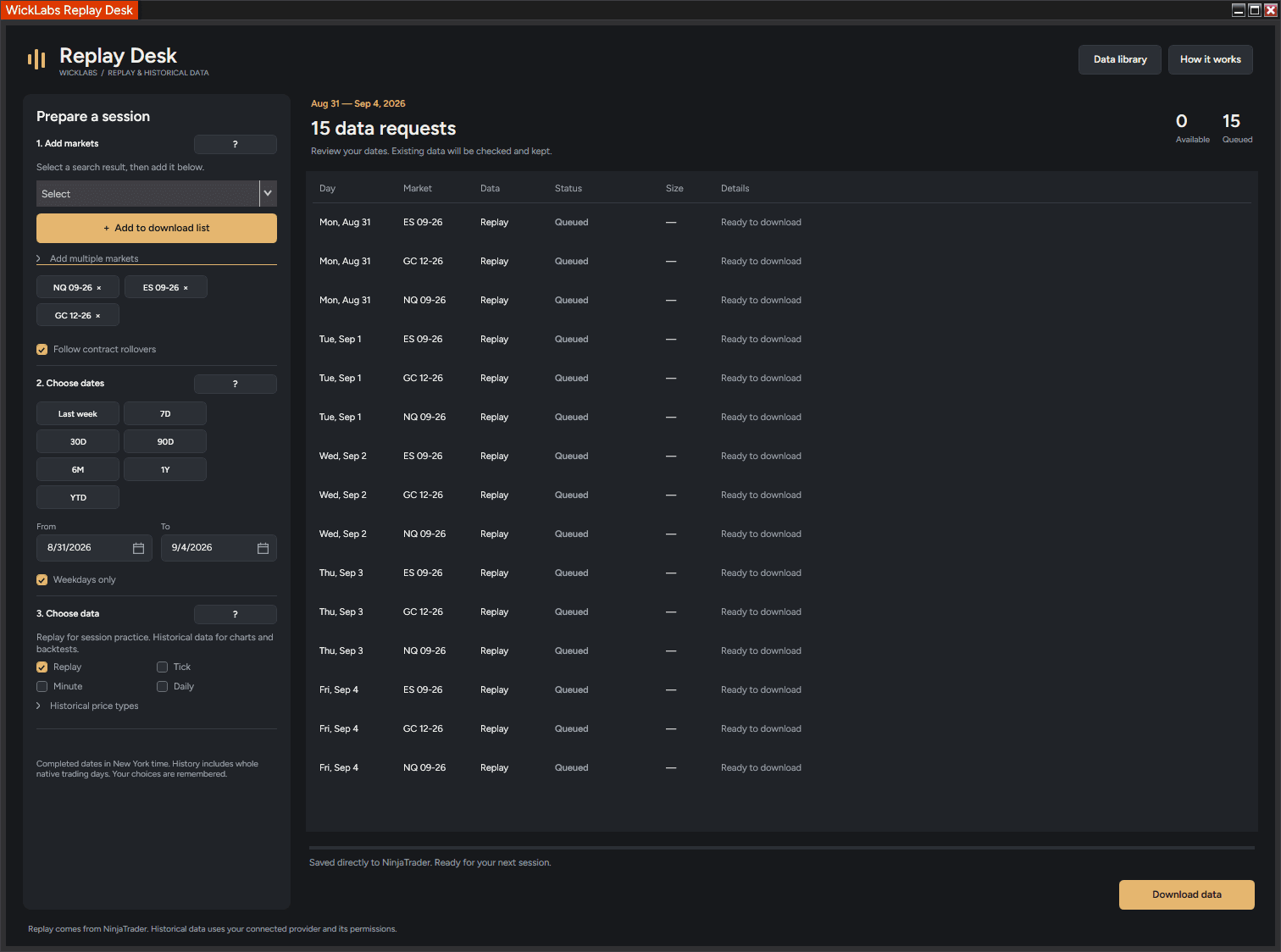
Replay Desk data download planner inside NinjaTrader 8

NinjaTrader already downloads historical data for instrument lists and date ranges. A separate utility earns its place through a workflow you prefer: repeated Replay batches, clearer planning, or a selected-data library and backup routine.

01

Which option fits your routine?

NinjaTrader’s standard Historical Data downloader

Start here for historical downloads or occasional Replay preparation. There is no separate utility to install or buy. Data subscriptions and exchange permissions are a separate question.

Try the native workflow ↓

WickLabs Replay Desk

Consider it for one Replay and historical download plan, a filterable native-file library, selected backups and an included restore helper. $59.99 lifetime, then $89.99 after the launch window. No trial; two personal computers.

Nexus Data Downloader

A commercial four-type toolkit to evaluate alongside Replay Desk. Compare the full Data Downloader offer and the optional Replay Restore, rather than comparing restore tools alone.

Compare commercial workflows ↓

AT Market Replay Data Pro

A Replay-focused commercial option. Consider whether recurring access and the vendor's workflow fit your practice schedule.

Compare commercial workflows ↓

Comfortable installing and compiling source? NT8ReplayDownloader by jalv92 is also worth inspecting as a no-license-fee Replay-focused option.

02

Replay Desk vs NinjaTrader’s standard Historical Data downloader

WorkflowReplay DeskBuilt-in NinjaTrader
Historical batchesMarkets and dates in one plan; Tick, Minute, DailyInstrument lists and date ranges are already supported
Market Replay batchesMultiple selected markets and dates in one queueDocumented dialog selects an instrument and one date
Contract rolloverExplicit contracts or configured roll dates; unmerged and unadjusted historyHistorical downloads follow the selected Merge Policy, including rollover switching
Library and backupFilter native files by market/type/period; selected .wlr backupsHistorical Data management plus built-in backup categories for history and Replay
RestoreIncluded helper, NinjaTrader closed; own .wlr archivesTools → Import → Backup File for NinjaTrader archives
Additional utility license$59.99 lifetime; $89.99 after the launch windowNone for these built-in tools; data-source charges may still apply

Native historical batching and rollover are real existing capabilities, not paid-tool exclusives. Sources: NinjaTrader historical downloads, Market Replay setup, backup and restore.

The choice is how you want to work. For a provider-supported historical list and date range, the native window may be enough. For regularly preparing several Replay markets and dates, compare queue setup, progress, error handling and the library workflow in the actual interface.

Replay Desk does not promise instant cancellation or unlimited plans: historical Stop finishes the active request, historical errors need manual Resume, and a plan is bounded at 100 markets, 10,000 requests and a 366-day span. Review these details before paying for convenience.

03

How to download and preserve data in NinjaTrader

Historical Tick, Minute and Daily

  1. Connect to a provider with the history you need. Open Tools → Historical Data in the Control Center.
  2. In Download, select an instrument or instrument list, then set the start and end dates.
  3. Choose intervals and quote data types, then download. Check your Merge Policy: merged modes can switch contracts across rollover; DoNotMerge requests the selected contract.

Keep the requested range within the provider's coverage, especially when you already hold older history. Official historical download steps ↗

Native Market Replay

  1. Disconnect Playback and disable Enable market recording for playback before downloading.
  2. Open Tools → Historical Data → Get Market Replay data.
  3. Select the instrument and date, then confirm. Repeat for the other dates you need. Keep the Historical Data window open while downloading.

Available server history is limited. Official Replay setup ↗

Built-in backup and restore

Disconnect data providers, then use Tools → Export → Backup File. Select the categories to include; NinjaTrader offers both Historical chart data and Market replay.

For a NinjaTrader backup archive, use Tools → Import → Backup File, choose the archive and select the categories to restore. Read the import dialog before proceeding.

Create a backup ↗ · Restore a backup ↗

Choose the right Playback mode

NinjaTrader can play Market Replay or historical Tick data. Replay can contain level I and level II events; historical playback uses ticks without market depth. In historical mode, quote handling also depends on the provider's tick stamps.

A minute-bar download is not a Replay recording. A downloaded file is not proof of every exchange execution. Official Playback behavior ↗

04

Nexus Data Downloader and AT Market Replay Data Pro

Vendor-advertised offerNexus Data DownloaderAT Market Replay Data Pro
Download scopeReplay, Tick, Minute and DailyMarket Replay preparation and download
Batch setupLists, dates, TXT/CSV importMultiple markets and dates
RolloverAdvertised contract expansionAutomatic rollover not established by the reviewed page
Library / backupAdvertised data management and portable backupsNot established by the reviewed page
RestoreHistorical in AddOn; Replay via optional $49 helperNot established by the reviewed page
Advertised price$120; $169 including Replay Restore, one-time€59 quarterly / €179 annually; €29.90 monthly subject to confirmation

Vendor sources, checked September 8, 2026: Nexus Data Downloader and AT Market Replay Data Pro. “Not established” means the reviewed page did not substantiate that feature; it does not prove the product lacks it. Prices use different currencies/access periods and exclude checkout differences.

Where Replay Desk differs

Our restore helper is included for both history and Replay, and both require NinjaTrader closed. Selected .wlr backups belong to our own format. At $59.99 lifetime, compare the entire toolkit you need, not an assumed speed advantage.

When an existing tool still fits

If you rely on Nexus archives or prefer historical restore inside its AddOn, keep that workflow in the decision. If AT's Replay focus fits your routine, review its current access terms. We have not run either commercial competitor in a controlled benchmark.

AT access, language and updates

AT advertises English and Spanish. Its published V1 plans describe maintenance during active access and possible separate terms for later major versions. Replay Desk is currently in English, with product updates included in its lifetime license.

AT’s quarterly and annual fees are in EUR; Replay Desk’s lifetime price is in USD. Compare the access period and final checkout total. A percentage-saving claim would need an exchange rate and a chosen subscription duration.

05

Free Replay automation: NT8ReplayDownloader

The jalv92/NT8ReplayDownloader repository publishes a Market Replay downloader under the MIT license. Its README describes multi-symbol downloads, retention probing, per-file depth checks and a CME equity-index rollover rule.

Installation is source-based: copy its AddOn file and compile in NinjaTrader. The author describes reliance on undocumented platform internals and validation against 8.1.8.0. Those are maintenance and compatibility considerations; we have not runtime-tested it.

Consider it if you want Replay automation and can evaluate the code. Its documented scope is not the combined Tick/Minute/Daily library-and-restore toolkit sold here. See the license and current README before choosing it.

06

Choose the source before the downloader.

Decide whether you need Market Replay, historical ticks or bars. Then confirm the exact instrument, contract, date range and quote/depth coverage at the source. Paying for Replay Desk does not buy a data subscription, expand server retention or manufacture missing dates.

Also decide what you need to preserve. NinjaTrader's broader backups can include settings and workspaces; Replay Desk's selected backups contain native market-data files and integrity information. Keep a separate platform backup when you need to preserve your entire working setup.

07

Before you choose a downloader.

Do I need to buy a NinjaTrader data downloader?

No. NinjaTrader's built-in Historical Data window supports instrument lists, date ranges and provider-supported historical data. It also provides a separate Market Replay download workflow. Start there if it already covers your needs; a paid utility is a workflow choice, not a requirement for historical downloads.

Can the normal NinjaTrader downloader download multiple instruments?

Yes. The official historical-download guide explicitly supports selecting an instrument list and a start/end range. Do not confuse that historical workflow with the native Market Replay dialog, which documents selecting an instrument and a single date.

Is Market Replay the same as historical Tick data?

No. NinjaTrader Playback can use either, but the data and behavior differ. Market Replay can contain level I and level II events. Historical playback uses historical ticks without market depth. Choosing Tick history does not turn it into a Market Replay recording.

Does a third-party utility unlock older or missing dates?

Do not assume so. Source retention, instrument coverage and permissions still apply. Replay Desk does not sell a separate archive or feed and cannot create unavailable history. Check the actual source and date coverage, not just the downloader's date selector.

Does NinjaTrader already have backup and restore?

Yes. Its built-in Backup File workflow can include historical chart data and Market Replay. Replay Desk adds a selected native-file library workflow and its own .wlr archive format; it is not the only way to preserve NinjaTrader data.

Are NinjaTrader, Nexus and Replay Desk backups interchangeable?

No interchangeability is claimed. Use NinjaTrader's restore workflow for its archives, the compatible Nexus tool for Nexus backups and Replay Desk's helper for .wlr backups. Keep original archives and their restore tools when changing utilities.